Tokeny task verification: setup, outputs and human review
Review the environment, actual outputs, corrections and checks behind six tutorials, including the CNY 515 workbook total and unresolved meeting decisions.
By Tokeny · Maintained by the Tokeny team · · Applies to Tokeny 1.7; check your installed tools
What do these checks establish?
On November 5, 2026, the Tokeny team checked the tasks behind six tutorials using Tokeny 1.7.6 on Windows with the online gpt-6-sol model. Inputs were synthetic, screenshots came from the actual client, and generated files are available to download. Some tasks passed only after model corrections and human review. These are inspectable examples, not a measured success rate across models or tasks.
Current getting-started instructions have been updated for 1.7.8. The task environment and screenshots recorded here remain version 1.7.6. English tutorial prompts are adaptations; the actual screenshots and files are in Chinese.
Environment and method
| Item | Conditions for this run |
|---|---|
| Maintainer and reviewer | The Tokeny team; tests conducted by the product's own team |
| Client and system | Installed Tokeny 1.7.6 on Windows |
| Model | Online gpt-6-sol, not local inference |
| Input and permissions | Synthetic input, a separate test profile and workspace, default permissions and review of individual operations |
| Document environment | Python, openpyxl 3.1.5 and python-docx 1.2.0; additional dependencies required configuration |
| MCP | MarkItDown MCP 0.0.1a8, with conversion discovered and called inside Tokeny |
| External validation | Microsoft Excel 16.0 recalculation; Microsoft Word 16.0 opening, pagination and rendering |
Six checks and downloadable evidence
| Task | What was checked | Input or result |
|---|---|---|
| Model connection | Selected a channel and model; a short request returned “connection successful” | Connection screenshot and steps |
| Meeting summary | Read and reread the file; reviewed actions, dates and unresolved conditions | Input notes · Actual summary |
| MCP conversion | Called MarkItDown inside Tokeny; checked headings, paragraphs and dates | Synthetic HTML · Converted Markdown |
| CSV to Excel | Corrected the first workbook, then checked formulas, categories, chart and recalculation | Order input · Actual XLSX |
| Meeting notes to Word | Reread facts, opened the file in Word and checked a one-page A4 layout | Actual DOCX |
| MCP and skill together | Converted HTML to Markdown, then generated a report; corrected an XML validation issue | Actual report · Full workflow |
Excel: why recalculate the output?
The six synthetic orders calculate revenue as quantity × unit price. The first output had numeric-type, formula-reference and chart-position issues. After human feedback and model corrections, Microsoft Excel calculated the workbook independently.
| Check | Expected value |
|---|---|
| Category totals for the original input | CNY 60, 135 and 320 |
| Original grand total | CNY 515 |
| Change the first order's quantity from 3 to 4 | Grand total becomes CNY 527 |
| Restore the original quantity | Grand total returns to CNY 515 |
These values apply only to the downloadable teaching sample. Recalculation after changing input checks that the workbook contains working calculations. Tokeny's spreadsheet preview shows cached values and collapses empty rows; inspect full styling and charts in Excel. See the CSV report tutorial.
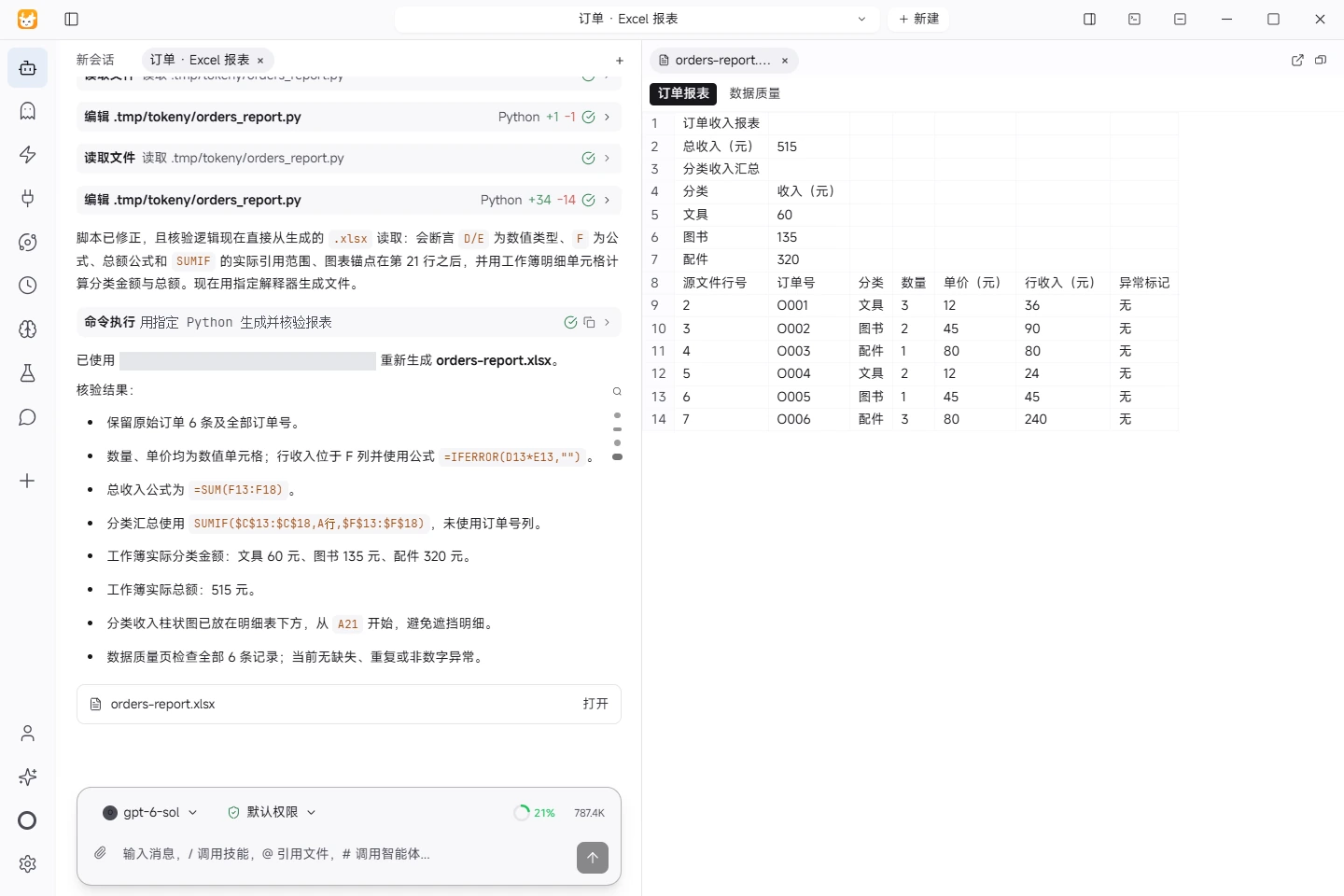
This is the actual November 5, 2026 task screenshot. The download is the corrected, recalculated workbook saved after restoring the original input.
Word: check facts as well as layout
The meeting minutes and project report were opened, repaginated and rendered in Word, each as one page. Review covered names, dates, actions and open questions, preserving that the November 12 launch still required review and the budget remained unapproved. A confirmed action means an agreed assignment, not completed work.
The tasks encountered a mistyped path and an XML validation issue, then continued after corrections. Downloadable files contain the reviewed results; they do not demonstrate error-free first attempts. See meeting notes to Word.
Apply the same checks to your work
- Preserve the original input and record the client version, model, required skills and MCP versions.
- Specify the output path, format and observable acceptance criteria.
- Check actual tool operations and saved paths, recording any corrections.
- Open the output in its corresponding application and review facts, formulas or layout rather than relying on the completion message.
- Keep the input, final file and review results together. Distinguish revised output from a successful first attempt.
These cases did not cover macOS, Linux, offline models, every provider or authenticated third-party account actions. The protocol initialization and tool-discovery checks for other MCP servers are also distinct from completed business tasks. See the product FAQ and current documentation for current workflows.
Found an issue? Include the page, app version and steps: tokeny@techxh.cn
Guides and tested examples
Tokeny FAQ: models, costs, offline use and files
Answers about setup, model connections, accounts, costs, data flows and stopping tasks, with links to instructions and tested examples.
Install Tokeny and complete your first task
Start with Tokeny 1.7.8: configure a model from the main workspace, create a project folder and verify a small file task.
Models and data flows
Compare your own API key, Tokeny channels and local models. Understand which data leaves your computer and how to check your setup.
Install, verify and troubleshoot MCP servers
Connect MCP servers with verified MarkItDown and Serena commands. Review versions, tool discovery and the limits of six server checks.
Turn CSV orders into an Excel report
Use synthetic orders to calculate revenue, build Excel formulas and a category chart, and reconcile the result against known totals.
Turn meeting notes into a Word document
Extract decisions, owners, due dates and open questions from synthetic meeting notes, then produce a Word document for review.
Skills vs MCP: differences and combinations
Skills describe workflows; MCP exposes callable tools. Learn how to combine them to convert source material and prepare a report.
Tokeny task verification: setup, outputs and human review
Review the environment, actual outputs, corrections and checks behind six tutorials, including the CNY 515 workbook total and unresolved meeting decisions.