Install, verify and troubleshoot MCP servers
Connect MCP servers with verified MarkItDown and Serena commands. Review versions, tool discovery and the limits of six server checks.
By Tokeny · Maintained by the Tokeny team · · Applies to Tokeny 1.7; check your installed tools
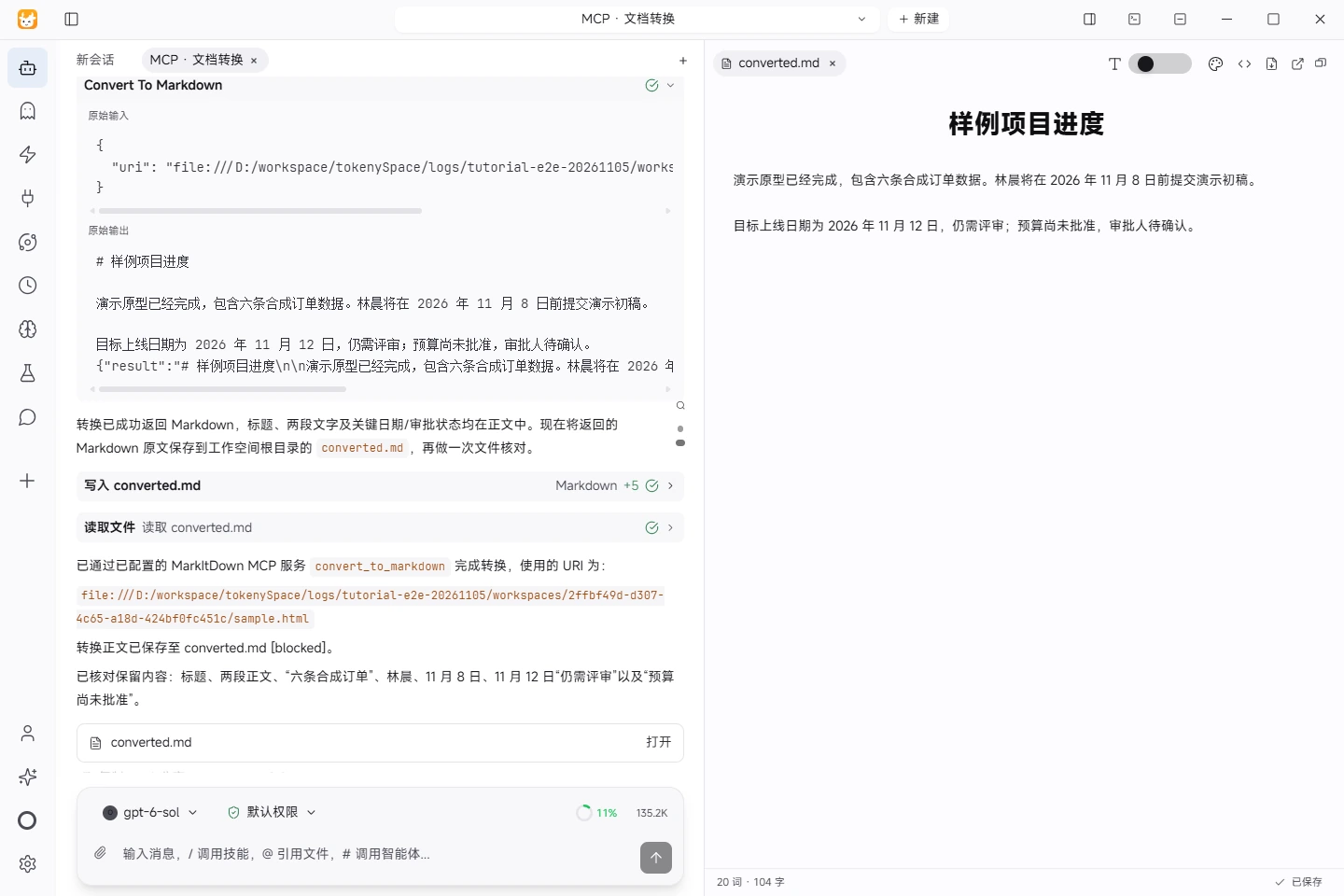
Actual task screenshot. MarkItDown MCP converted synthetic HTML inside Tokeny. The saved Markdown preserves the heading, text, dates and approval status. View full size ↗
Tested on November 5, 2026 · Windows · Tokeny 1.7.6 · gpt-6-sol online model · Synthetic input. Screenshots and output files use the Chinese interface and content.
Verify the connection before verifying a workflow
MCP (Model Context Protocol) exposes tools that Tokeny can call. Initialization and tool discovery establish a connection; they do not establish authenticated workflows or compatibility on every platform.
Installation
- Check the source, transport, command and runtime requirements in the MCP catalog. Read the upstream instructions.
- Add the service in Tokeny's MCP management. A stdio service needs an executable and arguments; a remote service needs its documented endpoint and authentication.
- Verify the executable is available to the app. On Windows, a working terminal command can still be absent from the application's PATH. Use the executable's absolute path when needed.
- Start the service and inspect the tool list. Begin with read-only synthetic input before processing business data.
Verified commands and limits
On November 5, 2026, six servers passed MCP initialization and tool discovery on a Windows x64 host using a Node.js MCP SDK protocol harness, not a Tokeny desktop end-to-end task. Versions below are the server-reported versions from that run, not a compatibility guarantee. MarkItDown also converted a local synthetic HTML file to Markdown. No authenticated Xiaohongshu publishing, likes, comments or other account actions were tested.
| Server | Version during check | Coverage |
|---|---|---|
| Context7 | 4.5.0 | Initialization; resolve-library-id and query-docs visible |
| Serena | 2.1.0 | Initialization; 24 tools visible |
| Playwright | 1.65.0-alpha-2026-10-30 | Initialization; 25 tools visible |
| Chrome DevTools | 1.12.0 | Initialization; 32 tools visible |
| Xiaohongshu MCP | 2.0.0 | Initialization; 18 tools visible; no account actions |
| MarkItDown | Package 0.0.1a8; server version not reported | Initialization, convert_to_markdown and synthetic HTML conversion |
MarkItDown:
uvx --prerelease=allow --from markitdown-mcp==0.0.1a8 markitdown-mcp
Serena:
uvx --from serena-agent==2.1.0 serena start-mcp-server --context ide --agent-interface tools --open-web-dashboard false --enable-web-dashboard false --enable-gui-log-window false
If the UI separates executable and arguments, use uvx as the executable and enter the remaining arguments individually. Do not put the entire command line in an executable-path field.
Check a minimal result
Create an HTML file with one heading and one plain paragraph. Call MarkItDown's convert_to_markdown tool and check that both survive. Add tables, links and larger documents only after this succeeds. The verification record contains public versions and test scope.
A further desktop run on the same date used Tokeny 1.7.6 and the online gpt-6-sol model to call MarkItDown MCP and save its result. The screenshot shows the actual tool response and file preview. Download the HTML input and converted Markdown, both in Chinese. The heading, both paragraphs, dates and approval status were checked. The other five servers retain the scope listed above.
Troubleshooting
| Symptom | Check |
|---|---|
| uvx / npx not found | Runtime installation and PATH; restart the app after environment changes. |
| MarkItDown version not found | Use the prerelease flag above; the pinned package is a prerelease. |
| Empty tool list | Startup arguments, stderr and MCP handshake; an ordinary CLI is not an MCP server. |
| Tool is visible but fails | Browser availability, file permissions, remote authentication and task prerequisites. |
Next, learn how skills and MCP work together and review data flows.
Found an issue? Include the page, app version and steps: tokeny@techxh.cn
Start with a practical guide
Install Tokeny and complete your first task
Choose an installer, configure a model and create a workspace. Complete a small task with an outcome you can verify.
Models and data flows
Compare your own API key, Tokeny channels and local models. Understand which data leaves your computer and how to check your setup.
Install, verify and troubleshoot MCP servers
Connect MCP servers with verified MarkItDown and Serena commands. Review versions, tool discovery and the limits of six server checks.
Turn CSV orders into an Excel report
Use synthetic orders to calculate revenue, build Excel formulas and a category chart, and reconcile the result against known totals.
Turn meeting notes into a Word document
Extract decisions, owners, due dates and open questions from synthetic meeting notes, then produce a Word document for review.
Skills vs MCP: differences and combinations
Skills describe workflows; MCP exposes callable tools. Learn how to combine them to convert source material and prepare a report.