Turn meeting notes into a Word document
Extract decisions, owners, due dates and open questions from synthetic meeting notes, then produce a Word document for review.
By Tokeny · Maintained by the Tokeny team · · Applies to Tokeny 1.7; check your installed tools
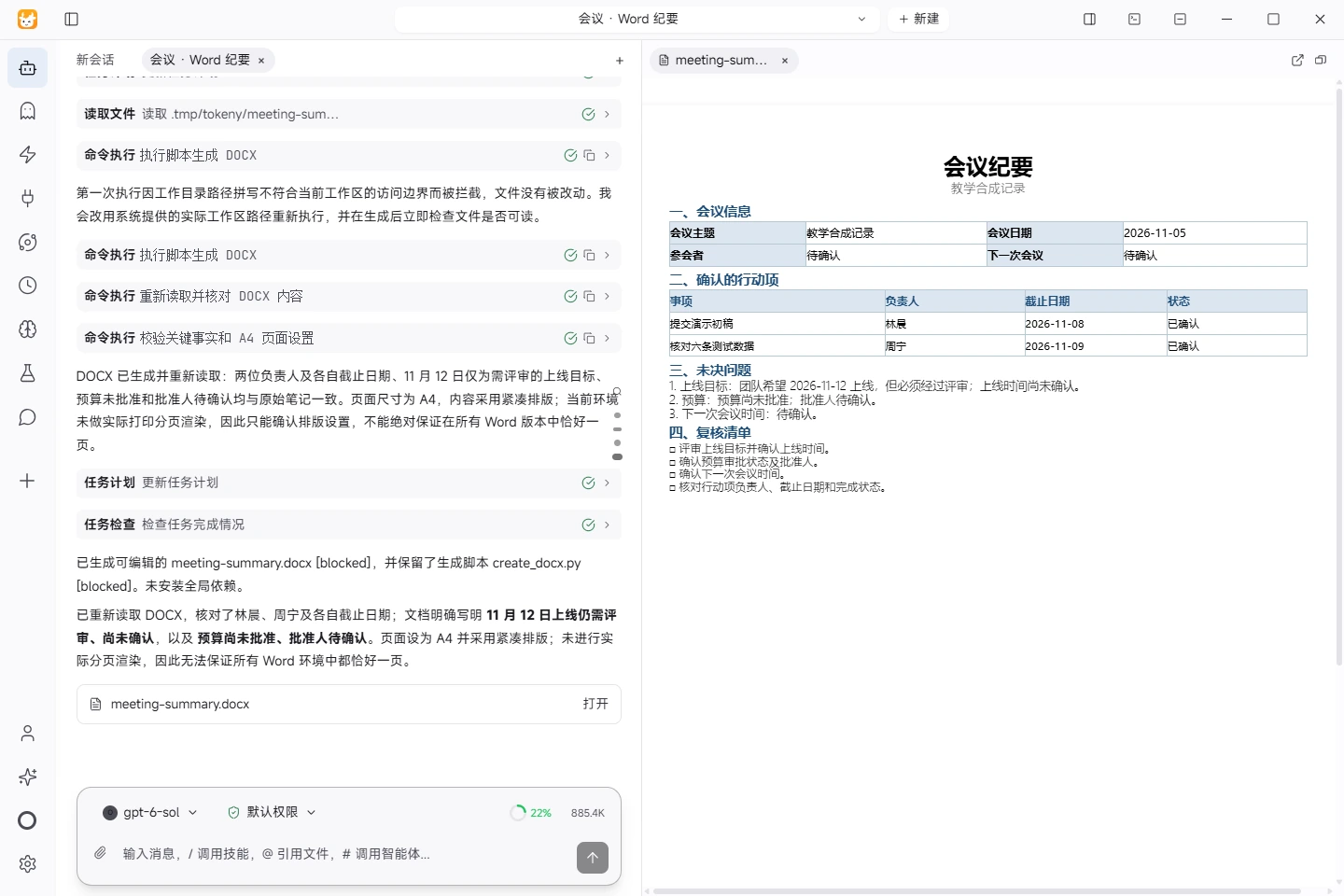
Actual task screenshot. The actual editable Word minutes. Both actions, names and dates were checked, while the launch review and unapproved budget remain explicit. View full size ↗
Tested on November 5, 2026 · Windows · Tokeny 1.7.6 · gpt-6-sol online model · Synthetic input. Screenshots and output files use the Chinese interface and content.
Separate discussion from decisions
Useful meeting minutes distinguish confirmed actions from proposals and unresolved questions. Do not invent an owner or turn a suggestion into a decision. This guide uses synthetic notes and applies to Tokeny 1.7 with document-generation tools.
Download meeting-notes.txt into a separate workspace. Names, project details and dates are teaching examples, not a real company meeting.
Facts in the input
The meeting date is November 5, 2026. Lin Chen will submit a demo draft by November 8. Zhou Ning will check six test records by November 9. The team aims for a November 12 launch, subject to review. The budget is not approved, its approver is unspecified, and the next meeting time is unconfirmed.
Prompt for Tokeny
Turn meeting-notes.txt into meeting-summary.docx in English. Include meeting details, confirmed action items, open questions and a review checklist. Use clear headings. The action table must contain task, owner, due date and status. Mark missing information as “to confirm.” Preserve the review condition on the launch target and the unapproved budget. Do not invent attendees, approvers or decisions.
Before generation, check that the source is complete, especially qualifiers such as “not yet,” “possibly” and “subject to review.” Review the output path and tool requirements before approving commands. Check the source of third-party document tools in the skills catalog.
Expected key content
| Action | Owner | Due date | Status |
|---|---|---|---|
| Submit demo draft | Lin Chen / 林晨 | 2026-11-08 | Pending |
| Check six test records | Zhou Ning / 周宁 | 2026-11-09 | Pending |
Open questions should include the review-dependent November 12 launch target, an unapproved budget with an unspecified approver, and the next meeting time. They are not completed or fully assigned actions.
Inspect the saved document
Open every page of the Word file. Check headings, table width, readable Chinese characters and editability. Reconcile names, dates and conditions against the input. The meeting owner should approve the facts before external distribution.
If the assistant only replies with text, request an actual DOCX and its saved path. For blank pages or clipped tables, adjust pagination and column widths without deleting required information. If “target launch” becomes “confirmed launch,” correct the wording and compare the result with the original again.
Download the actual generated minutes in Chinese. Tokeny 1.7.6 on Windows used the online gpt-6-sol model, the docx skill and an existing Python/python-docx environment. Microsoft Word opened the file and confirmed its single A4 page; both actions, names, dates and open questions were checked. “Confirmed” in this document means the action assignment is confirmed, not completed. The English prompt above is an adaptation.
Read models and data flows before using real meeting records. For a simpler file-writing exercise, start with your first task.
Found an issue? Include the page, app version and steps: tokeny@techxh.cn
Start with a practical guide
Install Tokeny and complete your first task
Choose an installer, configure a model and create a workspace. Complete a small task with an outcome you can verify.
Models and data flows
Compare your own API key, Tokeny channels and local models. Understand which data leaves your computer and how to check your setup.
Install, verify and troubleshoot MCP servers
Connect MCP servers with verified MarkItDown and Serena commands. Review versions, tool discovery and the limits of six server checks.
Turn CSV orders into an Excel report
Use synthetic orders to calculate revenue, build Excel formulas and a category chart, and reconcile the result against known totals.
Turn meeting notes into a Word document
Extract decisions, owners, due dates and open questions from synthetic meeting notes, then produce a Word document for review.
Skills vs MCP: differences and combinations
Skills describe workflows; MCP exposes callable tools. Learn how to combine them to convert source material and prepare a report.