Skills vs MCP: differences and combinations
Skills describe workflows; MCP exposes callable tools. Learn how to combine them to convert source material and prepare a report.
By Tokeny · Maintained by the Tokeny team · · Applies to Tokeny 1.7; check your installed tools
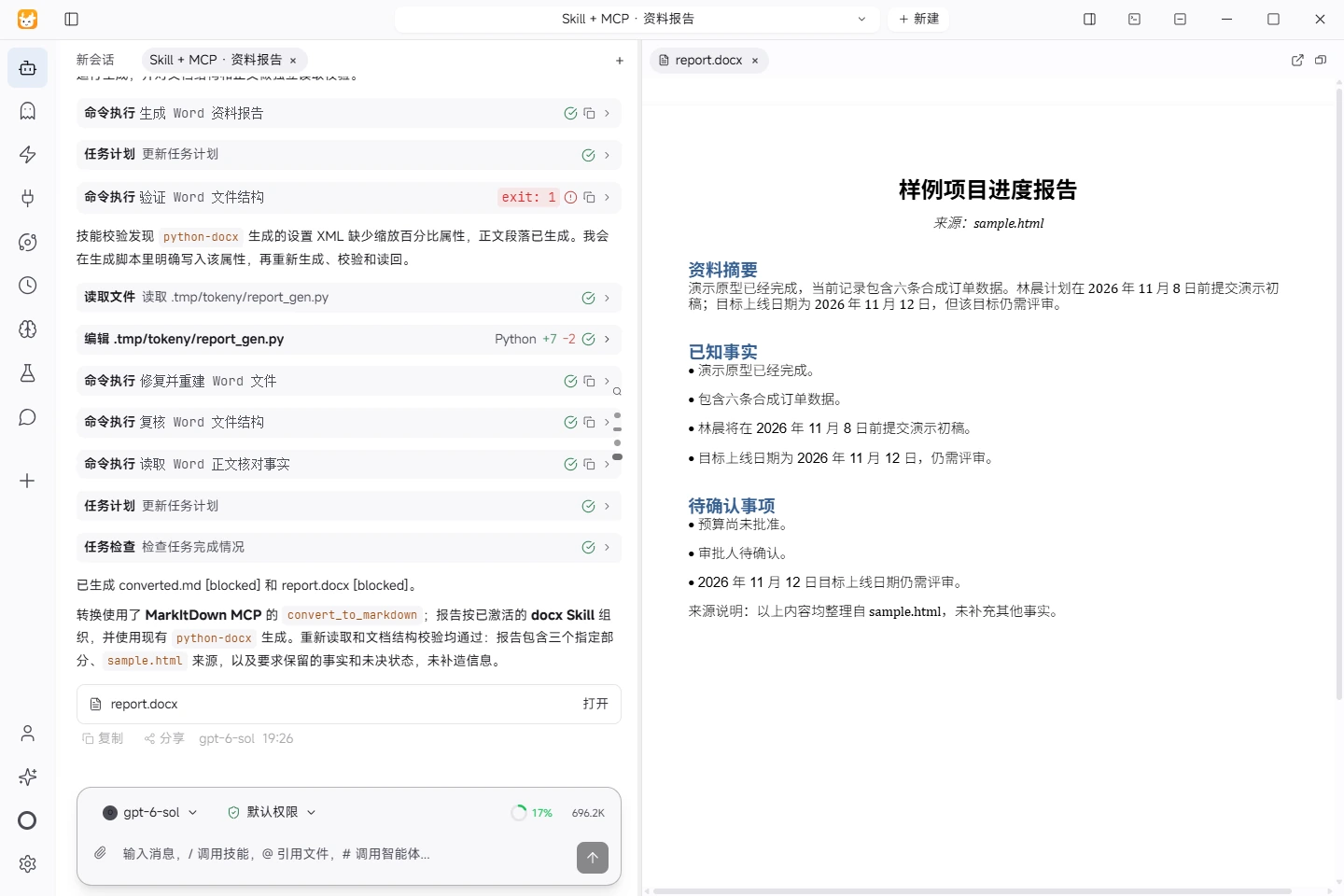
Actual task screenshot. A real combined workflow: MarkItDown extracts the HTML, the docx skill organizes the report, and the saved file includes a summary, facts, open questions and its source. View full size ↗
Tested on November 5, 2026 · Windows · Tokeny 1.7.6 · gpt-6-sol online model · Synthetic input. Screenshots and output files use the Chinese interface and content.
One describes a workflow; the other exposes tools
A skill usually bundles instructions, reference material and optional scripts for a type of work. MCP is a protocol through which a client discovers and calls external tools. They can work together, but a skill does not automatically provide service accounts, and an MCP connection does not supply a complete workflow.
| Dimension | Skill | MCP |
|---|---|---|
| Main purpose | Steps, constraints, output conventions and reusable knowledge | Callable tools, resources or service capabilities |
| Typical contents | SKILL.md, references and optional scripts | A local process or remote service plus connection settings |
| Check after setup | Entry instructions, dependencies and output requirements | Initialization, tool list, arguments and authorization scope |
| Does not guarantee | The model follows every instruction | Every tool completes tasks in your environment |
Example: convert source material, then prepare a report
Use MarkItDown MCP to convert a short HTML file you created. Then use a document skill to organize the result into a summary, facts and open questions. The conversion tool extracts content, the skill provides the method, and the model coordinates the task.
- Review the verified initialization commands in the MCP setup guide.
- Create synthetic HTML with a heading and two paragraphs. Check that conversion preserves the text.
- Select a suitable document skill, read its SKILL.md and check scripts and runtime requirements.
- Give a concrete request: “Use MarkItDown MCP to convert sample.html and save converted.md. Activate the docx skill to generate report.docx with a summary, known facts and open questions. Preserve source facts, mark missing information as unconfirmed, cite the source and read the saved document back to verify it.”
- Open the actual output and reconcile its content and structure before trying more complex source material.
This combined workflow ran in Tokeny 1.7.6 on Windows with the online gpt-6-sol model: MarkItDown was called, the docx skill was activated, Markdown and Word files were saved, and the report was read back and validated. The run used an existing Python/python-docx environment and corrected one document XML validation issue. Microsoft Word confirmed the single-page layout and the facts were checked. This synthetic example does not establish results for other models or business documents.
Compare the synthetic HTML, actual converted text and actual Word report, all in Chinese.
Choosing a capability
If existing file tools are sufficient and you need a consistent report format, start with a skill. If the task needs an external capability the client does not expose, evaluate an MCP server. A simple task may already be covered by built-in tools.
Third-party skill scripts can perform operations, and MCP servers can access the network. Review sources, permissions and data destinations. A local process is not necessarily offline; see models and data flows.
Validate at three levels
First check connection and discovery. Then run one tool with minimal input. Finally check whether the task's saved output is correct, complete and editable. Passing the first level does not establish the others.
Practice task-level validation with the CSV report and meeting minutes samples. Protocol reference: official MCP introduction.
Found an issue? Include the page, app version and steps: tokeny@techxh.cn
Start with a practical guide
Install Tokeny and complete your first task
Choose an installer, configure a model and create a workspace. Complete a small task with an outcome you can verify.
Models and data flows
Compare your own API key, Tokeny channels and local models. Understand which data leaves your computer and how to check your setup.
Install, verify and troubleshoot MCP servers
Connect MCP servers with verified MarkItDown and Serena commands. Review versions, tool discovery and the limits of six server checks.
Turn CSV orders into an Excel report
Use synthetic orders to calculate revenue, build Excel formulas and a category chart, and reconcile the result against known totals.
Turn meeting notes into a Word document
Extract decisions, owners, due dates and open questions from synthetic meeting notes, then produce a Word document for review.
Skills vs MCP: differences and combinations
Skills describe workflows; MCP exposes callable tools. Learn how to combine them to convert source material and prepare a report.