Log Data Analysis: a Tokeny case study
Analyze server log files to extract error patterns, access trends, and anomaly detection reports. Follow the recorded task, execution screenshots, actual files and verification notes.
By the Tokeny team · Windows · Tokeny 1.7.8 · gpt-6-sol
Prepare the inputs
Create a separate workspace in Tokeny, download and unpack the sample inputs, then select a model that supports tools. The sample uses synthetic data or the public sources named in the article.
- access.log
Send the task to Tokeny
The original task was executed in Chinese. Copying these instructions reproduces the same task; the results below include an English report.
分析日志中的错误类型、分钟级请求量和慢请求,输出结构化 CSV 与 Markdown 报告,标明时区和样本范围。

交付文件:errors.csv、log-analysis.md。
验收要点:
- 6 次请求,2 个 500、1 个 401
- 两条超过 1000ms
- 不把 401 与服务端故障混为一类
这是使用合成演示输入或指定公开资料的真实操作案例。请先读取工作空间输入,再实际生成文件并自检。所有写入、脚本与临时服务限于当前工作空间;临时服务只监听 127.0.0.1,执行后关闭;不触达外部收件人、不发布、不付款、不更改系统设置,不调用子智能体。需要公开资料时可读取给定 URL。只启用完成任务必需的工具。另写 report.md(中文)和 report.en.md(英文),每份 400–800 字,包含输入、处理步骤、真实结果、检查方式和局限;失败或未验证部分如实记录,不能宣称成功。最终回复用中文列出产物、关键结果与待核实项。
The recorded run used an isolated demonstration workspace. Review the commands and file paths before approving operations in your own workspace.
What actually ran
The task was submitted through the Tokeny input box. An online model read the inputs and executed tools. This run covers the local sample task and its actual files. Results and checks are recorded below.
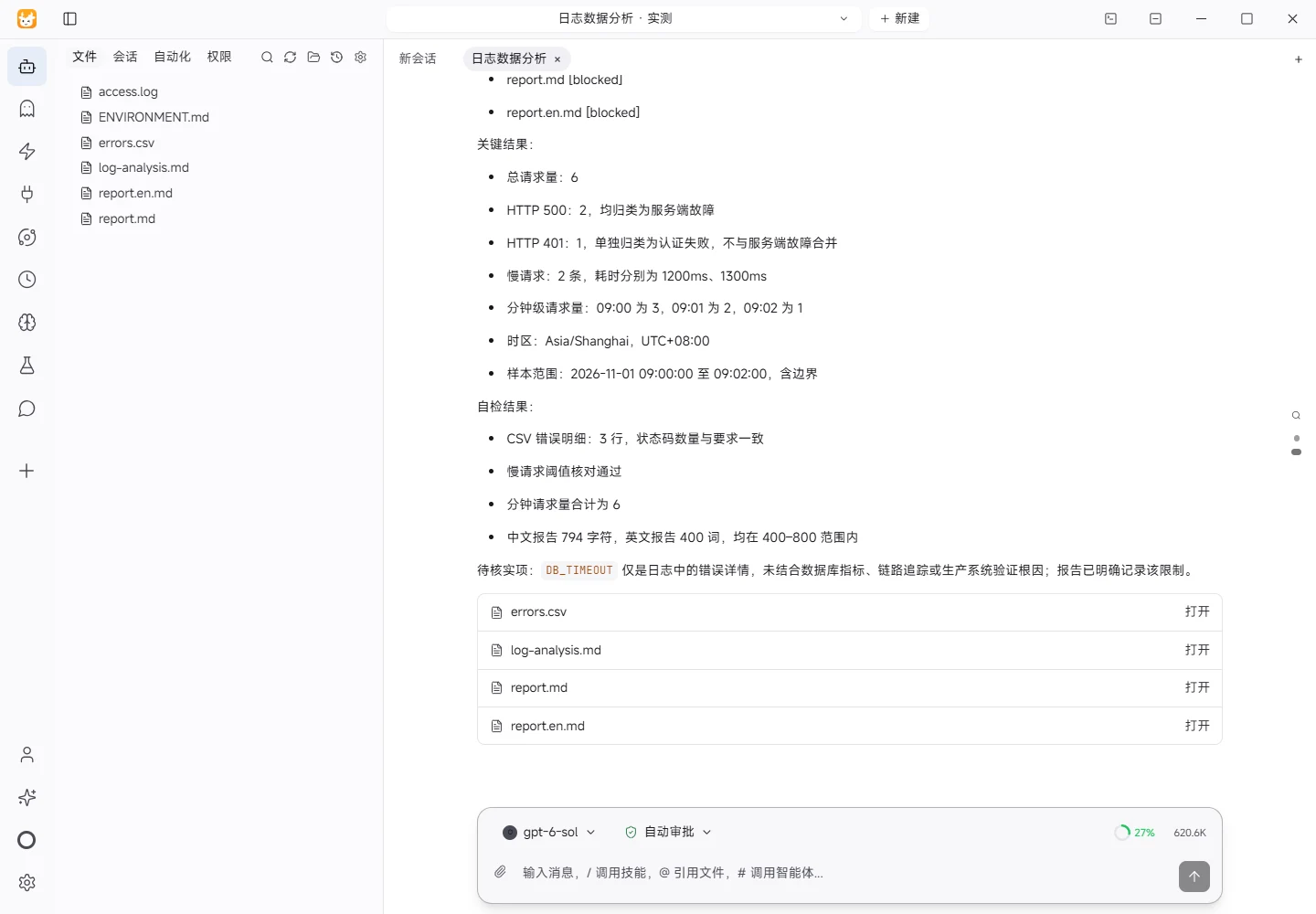
Results and verification
Input
This analysis used the workspace file access.log and no external source. The input contains six valid access records from 2026-11-01 09:00:00 through 09:02:00, inclusive. Every timestamp includes the +08:00 offset, so all reported times use Asia/Shanghai (UTC+08:00). Each line contains a timestamp, HTTP method, path, status, and latency. Error lines also contain an error detail. No records were added or removed during analysis.
Processing
The log was parsed into structured fields. The timestamp was assigned to a minute bucket for request-volume aggregation. HTTP 200 was treated as success. HTTP 401 was classified separately as an authentication failure, while HTTP 500 was classified as a server fault. This distinction prevents a bad token from being counted as a service-side outage. A slow request was defined as latency strictly greater than 1000 ms. The three error records were written to errors.csv; the Markdown analysis includes the full request total, minute-level volume, error categories, and slow-request details.
Actual results
The sample contains six requests: three successes, two HTTP 500 responses, and one HTTP 401 response. Both 500 responses targeted /api/orders, carried the detail DB_TIMEOUT, and took 1200 ms and 1300 ms. They are therefore the two slow requests. The 401 response targeted /api/login, carried BAD_TOKEN, and took 12 ms. It is an authentication failure and is excluded from the server-fault count. Minute-level volume was three requests at 09:00, two at 09:01, and one at 09:02, all in Asia/Shanghai time. The CSV contains exactly two 500 error rows and one 401 error row.
Verification
The source lines were checked against the parsed records. I verified the total of six, the status counts, the strict greater-than-1000-ms rule, and the minute totals summing to six. I also checked that the CSV retains the distinct 401 and 500 categories and that both reports state the timezone and inclusive sample range.
Limitations
This is a small synthetic demonstration sample covering roughly two minutes. It cannot establish long-term traffic patterns, a stable error rate, availability, or a confirmed root cause. DB_TIMEOUT is only the detail recorded in the log. Database metrics, traces, retry behavior, and infrastructure signals were unavailable. The report describes observed facts rather than inferring that the database itself failed. No production replay or external-system validation was performed, so those points remain unverified. A larger time window and correlated application metrics would be needed before treating these counts as an operational baseline. The CSV is intentionally an error-only extract, while the Markdown tables retain the complete request-volume context for review.
Download and inspect the outputs
The archive contains the files created during this run. Use these checks when adapting the example to your own data.
- Reconcile the reported results against the downloadable sample inputs.
- Open the generated files and check the contents relevant to your task.
- Review the limitations and any unverified steps in the report.