Financial Report Assembly: a Tokeny case study
Consolidate financial data from multiple Excel sheets into income, balance, and cash flow statements. Follow the recorded task, execution screenshots, actual files and verification notes.
By the Tokeny team · Windows · Tokeny 1.7.8 · gpt-6-sol
Prepare the inputs
Create a separate workspace in Tokeny, download and unpack the sample inputs, then select a model that supports tools. The sample uses synthetic data or the public sources named in the article.
- balance.csv
- cashflow.csv
- income.csv
Send the task to Tokeny
The original task was executed in Chinese. Copying these instructions reproduces the same task; the results below include an English report.
合并三张账务表,生成利润表、资产负债表和现金流量表 Excel。将收入减费用、资产等于负债加权益、现金变动三个勾稽关系写入核对表。

交付文件:statements.xlsx。
验收要点:
- 利润 25000 元
- 资产和负债权益均为 100000 元
- 期末现金 50000 元
这是使用合成演示输入或指定公开资料的真实操作案例。请先读取工作空间输入,再实际生成文件并自检。所有写入、脚本与临时服务限于当前工作空间;临时服务只监听 127.0.0.1,执行后关闭;不触达外部收件人、不发布、不付款、不更改系统设置,不调用子智能体。需要公开资料时可读取给定 URL。只启用完成任务必需的工具。另写 report.md(中文)和 report.en.md(英文),每份 400–800 字,包含输入、处理步骤、真实结果、检查方式和局限;失败或未验证部分如实记录,不能宣称成功。最终回复用中文列出产物、关键结果与待核实项。
Follow-up instructions after review (1)
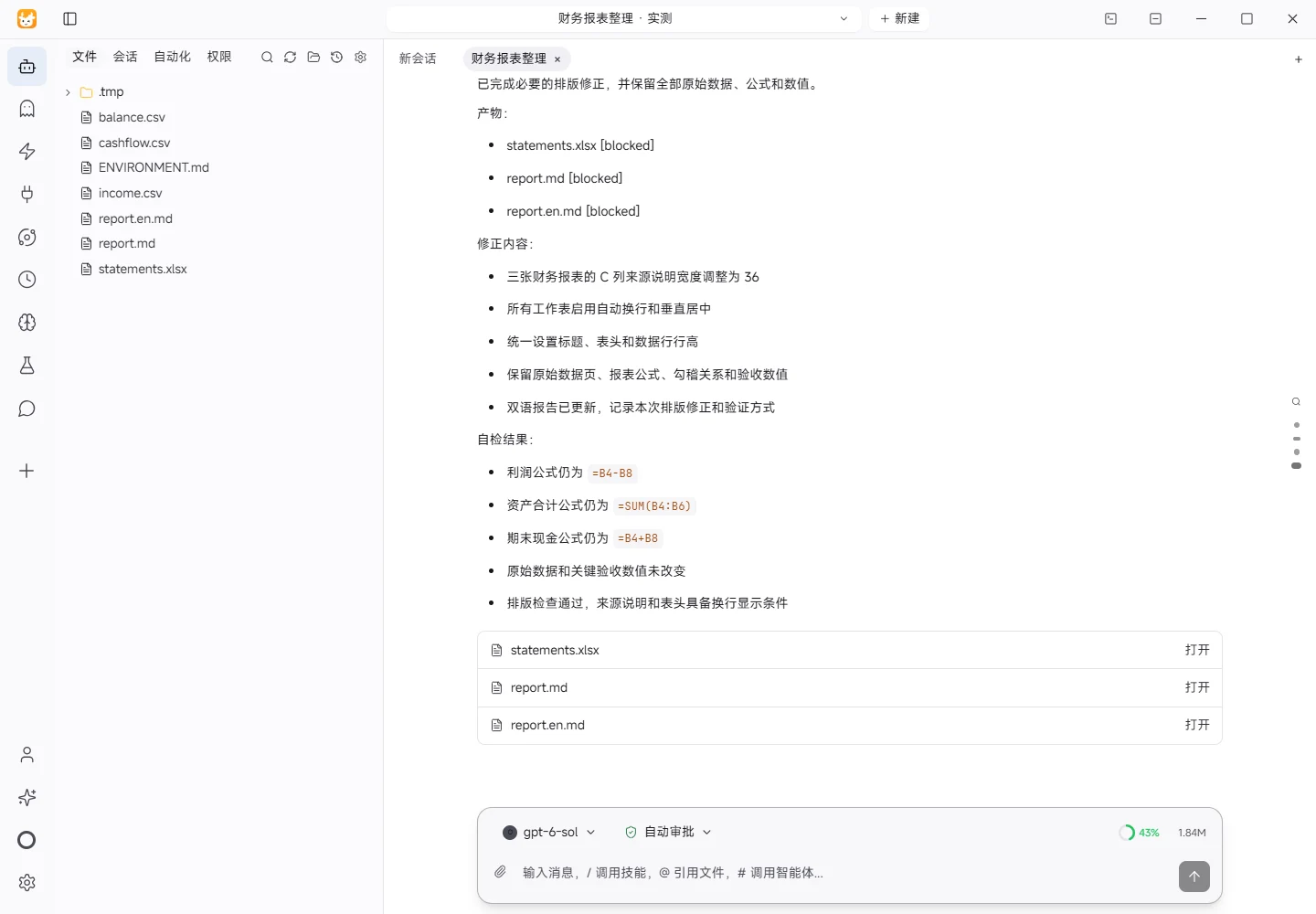
独立渲染发现 statements.xlsx 的财务报表 C 列来源说明被截断(C 列只有18字符宽且未换行)。请调整所有工作表的列宽、自动换行与行高,保证来源说明和表头完整显示;保留全部原始数据、公式和数值。只做必要排版修正并更新双语报告,无需固定字数。
The recorded run used an isolated demonstration workspace. Review the commands and file paths before approving operations in your own workspace.
What actually ran
The task was submitted through the Tokeny input box. An online model read the inputs and executed tools. This run covers the local sample task and its actual files. Results and checks are recorded below.
Results and verification
Input
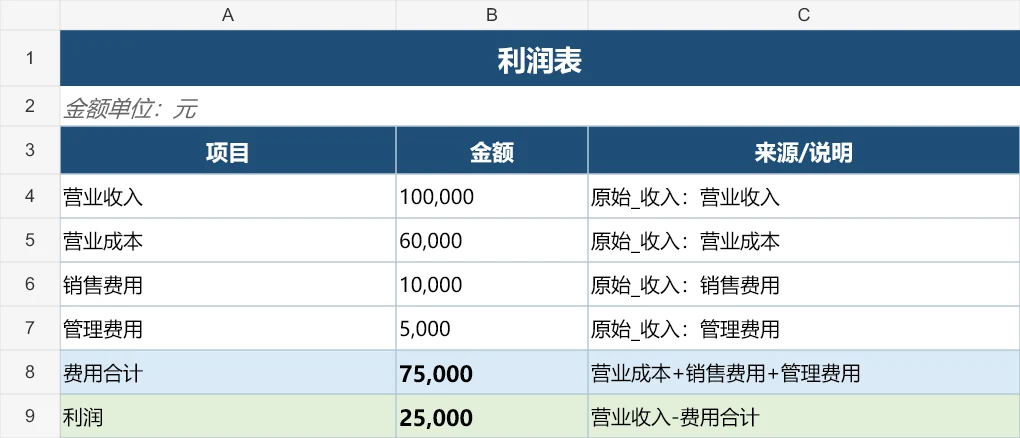
This test used the three synthetic demonstration CSV files already present in the workspace: income.csv, balance.csv, and cashflow.csv. The income input contains revenue of RMB 100,000, cost of sales of RMB 60,000, selling expenses of RMB 10,000, and administrative expenses of RMB 5,000. The balance input contains cash of RMB 50,000, accounts receivable of RMB 20,000, fixed assets of RMB 30,000, liabilities of RMB 40,000, and owners' equity of RMB 60,000. The cash-flow input contains opening cash of RMB 30,000, operating inflows of RMB 90,000, operating outflows of negative RMB 65,000, and investing outflows of negative RMB 5,000. Each CSV was read row by row using its item,amount structure; blank trailing rows were ignored.
Processing
The source rows were first parsed into amount mappings. The workbook statements.xlsx was then created with three preserved raw-data sheets and four reporting sheets: Income Statement, Balance Sheet, Cash Flow Statement, and Reconciliation Check. Reporting cells use formulas linked to the raw-data sheets. The Income Statement calculates total expenses and profit. The Balance Sheet calculates total assets and total liabilities plus equity. The Cash Flow Statement calculates the net cash movement and closing cash. The reconciliation sheet records three required relationships: revenue minus expenses equals profit; assets equal liabilities plus equity; and closing cash on the Cash Flow Statement equals cash on the Balance Sheet. Each relationship shows a difference and a pass/fail status. Workbook calculation is configured for automatic recalculation when opened by Excel. To correct the display issue, the reporting sheets' source-description column C was widened to 36, and all worksheets were given wrapped, vertically centered cells with explicit title, header, and data-row heights.
Actual Results
An independent calculation from the source rows produced the following results. Profit is RMB 100,000 minus RMB 60,000 minus RMB 10,000 minus RMB 5,000, equal to RMB 25,000. Total assets are RMB 50,000 plus RMB 20,000 plus RMB 30,000, equal to RMB 100,000. Total liabilities and equity are RMB 40,000 plus RMB 60,000, also equal to RMB 100,000. Net cash movement is RMB 90,000 minus RMB 65,000 minus RMB 5,000, equal to RMB 20,000, so closing cash is RMB 30,000 plus RMB 20,000, equal to RMB 50,000. These values satisfy the requested acceptance criteria.
Verification
The generation script asserted the independent numerical results, checked that the workbook exists and is non-empty, reopened the workbook, confirmed all seven expected sheets, and verified the key formula texts and the overall reconciliation formula. It also checked worksheet widths, wrapping, and row heights so source notes and headers remain visible. The three raw inputs, report formulas, and check relationships are therefore structurally traceable. No external data, temporary service, external recipient, payment, or system-setting change was used.
Limitations
The verification performed here combines source-based numerical recalculation with formula-structure inspection. Desktop Excel was not launched in this environment, so a GUI recalculation and readback of Excel's cached formula values was not performed. The workbook is configured to recalculate when opened. The inputs are synthetic demonstration data, and no accounting-policy review, period-end assessment, tax calculation, depreciation review, cash-flow classification review, voucher-level reconciliation, or audit procedure was performed. This output should not be treated as a substitute for formal financial-statement preparation, review, or audit.
Download and inspect the outputs
The archive contains the files created during this run. Use these checks when adapting the example to your own data.
- Reconcile the reported results against the downloadable sample inputs.
- Open the generated files and check the contents relevant to your task.
- Review the limitations and any unverified steps in the report.