Study Plan Creation: a Tokeny case study
Generate phased personalized study plans based on learning goals and available time. Follow the recorded task, execution screenshots, actual files and verification notes.
By the Tokeny team · Windows · Tokeny 1.7.8 · gpt-6-sol
Prepare the inputs
Create a separate workspace in Tokeny, download and unpack the sample inputs, then select a model that supports tools. The sample uses synthetic data or the public sources named in the article.
- learner.md
Send the task to Tokeny
The original task was executed in Chinese. Copying these instructions reproduces the same task; the results below include an English report.
制定 4 周 SQL 入门学习计划,每周一三五各 45 分钟,周日 90 分钟;按 SELECT、过滤、聚合、连接逐步安排,带里程碑和复盘问题。

交付文件:study-plan.md、schedule.csv。
验收要点:
- 每周 225 分钟,总计 900 分钟
- 只安排指定星期
- 阶段成果可检查
这是使用合成演示输入或指定公开资料的真实操作案例。请先读取工作空间输入,再实际生成文件并自检。所有写入、脚本与临时服务限于当前工作空间;临时服务只监听 127.0.0.1,执行后关闭;不触达外部收件人、不发布、不付款、不更改系统设置,不调用子智能体。需要公开资料时可读取给定 URL。只启用完成任务必需的工具。另写 report.md(中文)和 report.en.md(英文),简洁、完整,包含输入、处理步骤、真实结果、检查方式和局限;失败或未验证部分如实记录,不能宣称成功。最终回复用中文列出产物、关键结果与待核实项。
排版检查:Word 主标题仅出现一次,标题为黑色且与后续正文或表格保持同页;Excel 表头和长文字不能被窄列截断,合理设置列宽、换行、行高;HTML 在 390px 视口不能整页横向溢出。报告没有固定字数要求,不要为字数反复改写。
The recorded run used an isolated demonstration workspace. Review the commands and file paths before approving operations in your own workspace.
What actually ran
The task was submitted through the Tokeny input box. An online model read the inputs and executed tools. This run covers the local sample task and its actual files. Results and checks are recorded below.
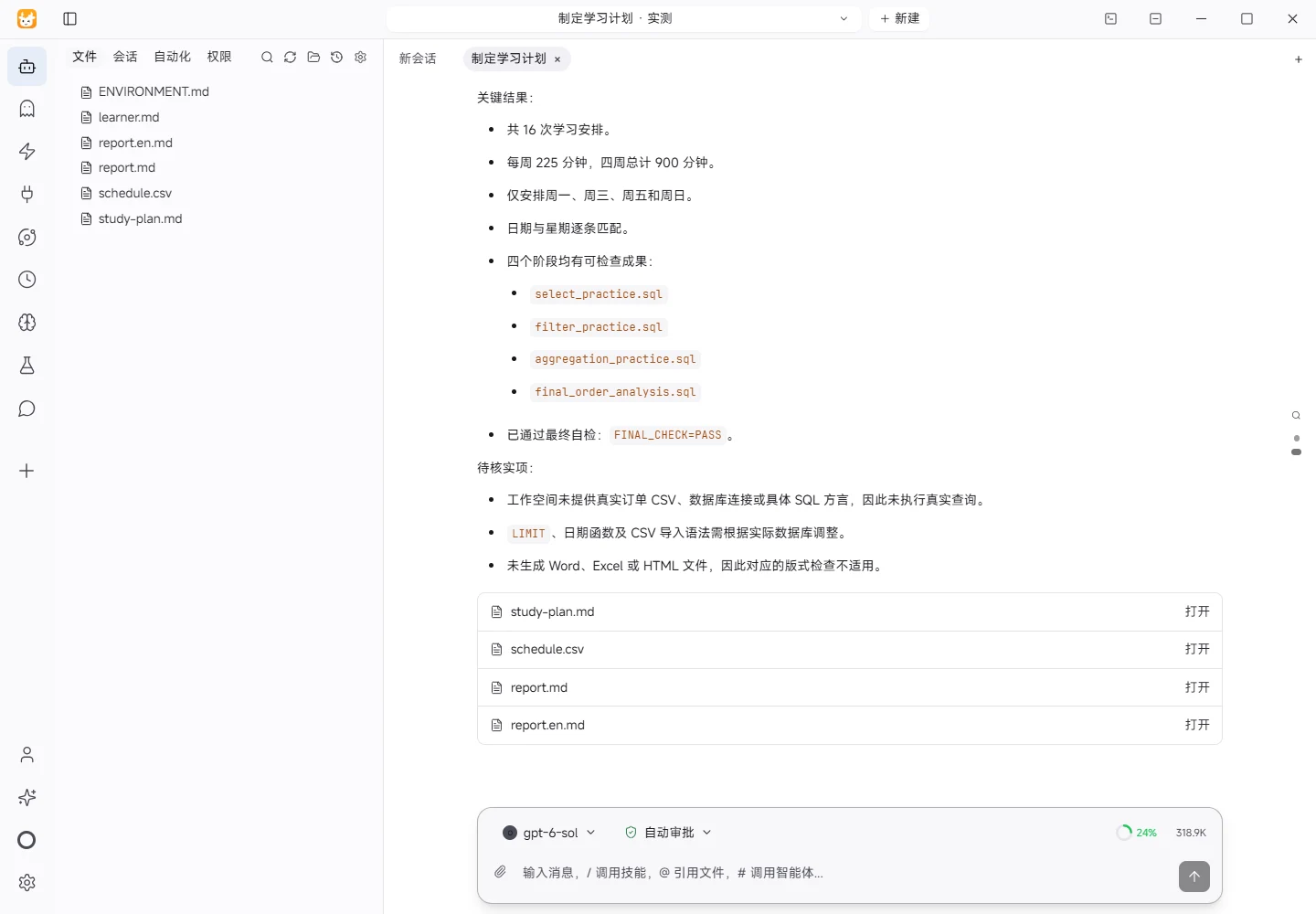
Results and verification
Inputs
The workspace inputs were read first:
learner.md: the learner has Excel experience, no programming background, wants to analyze an orders CSV after import into a database, cannot study every day, and starts on Monday, 2026-11-09.ENVIRONMENT.md: Windows isolated demo workspace and available runtime information..tokeny/manifest.json: confirms the current workspace is "制定学习计划 · 实测".
Processing
- Split four weeks into 45 minutes on Monday, Wednesday, and Friday, plus 90 minutes on Sunday.
- Progress week by week through SELECT, filtering, aggregation, and joins, with a goal, deliverable, and check for every session.
- Generated
study-plan.mdfor the full plan andschedule.csvfor the session-level schedule. - Generated this English report and the Chinese report to document inputs, processing, results, checks, and limitations.
Actual Results
- Generated 16 sessions from 2026-11-09 through 2026-12-06.
- Each week contains 225 minutes; the four-week total is 900 minutes.
- Only Monday, Wednesday, Friday, and Sunday are scheduled.
- Four checkable milestones are included:
select_practice.sql,filter_practice.sql,aggregation_practice.sql, andfinal_order_analysis.sql, with result check sheets or result tables. - Every week includes review questions; week 4 checks join keys, result grain, duplicate counting, and data quality.
Verification Method
A Python standard-library check reads schedule.csv and verifies row count, allowed weekdays, minutes per week, total minutes, date order, and topic coverage. The Markdown plan is also checked for milestones, review questions, and the final checklist. The actual check returned 16 rows, 225 minutes for each of weeks 1–4, 900 minutes total, weekdays limited to Monday/Wednesday/Friday/Sunday, and coverage of SELECT, filtering, aggregation, and joins. Dates were in order, and the milestones, review questions, and final checklist were present.
Limitations
- No real orders CSV, database connection, or database dialect was provided, so real queries were not executed and actual field values were not validated.
LIMIT, date functions, and CSV import syntax may differ across SQLite, MySQL, PostgreSQL, and other systems; they must be adapted to the actual database.- No Word, Excel, or HTML file was generated, so the corresponding rendered-layout checks were not applicable; Markdown and CSV were delivered as plain text files.
Download and inspect the outputs
The archive contains the files created during this run. Use these checks when adapting the example to your own data.
- Reconcile the reported results against the downloadable sample inputs.
- Open the generated files and check the contents relevant to your task.
- Review the limitations and any unverified steps in the report.