Bid Document Generation: a Tokeny case study
Auto-generate compliant tender or bid documents based on project requirements. Follow the recorded task, execution screenshots, actual files and verification notes.
By the Tokeny team · Windows · Tokeny 1.7.8 · gpt-6-sol
Prepare the inputs
Create a separate workspace in Tokeny, download and unpack the sample inputs, then select a model that supports tools. The sample uses synthetic data or the public sources named in the article.
- project-brief.md
Send the task to Tokeny
The original task was executed in Chinese. Copying these instructions reproduces the same task; the results below include an English report.
把项目材料整理成 Word 招标文件草稿,包括需求、交付范围、6 周进度、建议评分表与待确认资格条件;评分合计 100,不能编造法定资格。

交付文件:tender-draft.docx、scoring.csv。
验收要点:
- 评分合计 100 分
- 预算与排期一致
- 不声称可直接法定发布
这是使用合成演示输入或指定公开资料的真实操作案例。请先读取工作空间输入,再实际生成文件并自检。所有写入、脚本与临时服务限于当前工作空间;临时服务只监听 127.0.0.1,执行后关闭;不触达外部收件人、不发布、不付款、不更改系统设置,不调用子智能体。需要公开资料时可读取给定 URL。只启用完成任务必需的工具。另写 report.md(中文)和 report.en.md(英文),简洁、完整,包含输入、处理步骤、真实结果、检查方式和局限;失败或未验证部分如实记录,不能宣称成功。最终回复用中文列出产物、关键结果与待核实项。
排版检查:Word 主标题仅出现一次,标题为黑色且与后续正文或表格保持同页;Excel 表头和长文字不能被窄列截断,合理设置列宽、换行、行高;HTML 在 390px 视口不能整页横向溢出。报告没有固定字数要求,不要为字数反复改写。
Follow-up instructions after review (1)
已用 Microsoft Word 原生分页复核:第 1 页底部“三、交付范围”仅跟着一行表头,正文数据全在第 2 页;评分表也有跨页文字风险。请只修正分页:每个章节标题、表头和至少第一条数据行保持同页;保留跨页重复表头,禁止单行被拆开。可对三、交付范围整体前置分页,避免页末只剩表头。保留需求、6 周、60000 元和评分 100 分等内容,更新报告记录这次检查。
The recorded run used an isolated demonstration workspace. Review the commands and file paths before approving operations in your own workspace.
What actually ran
The task was submitted through the Tokeny input box. An online model read the inputs and executed tools. This run covers the local sample task and its actual files. Results and checks are recorded below.
Results and verification
Inputs
- Read
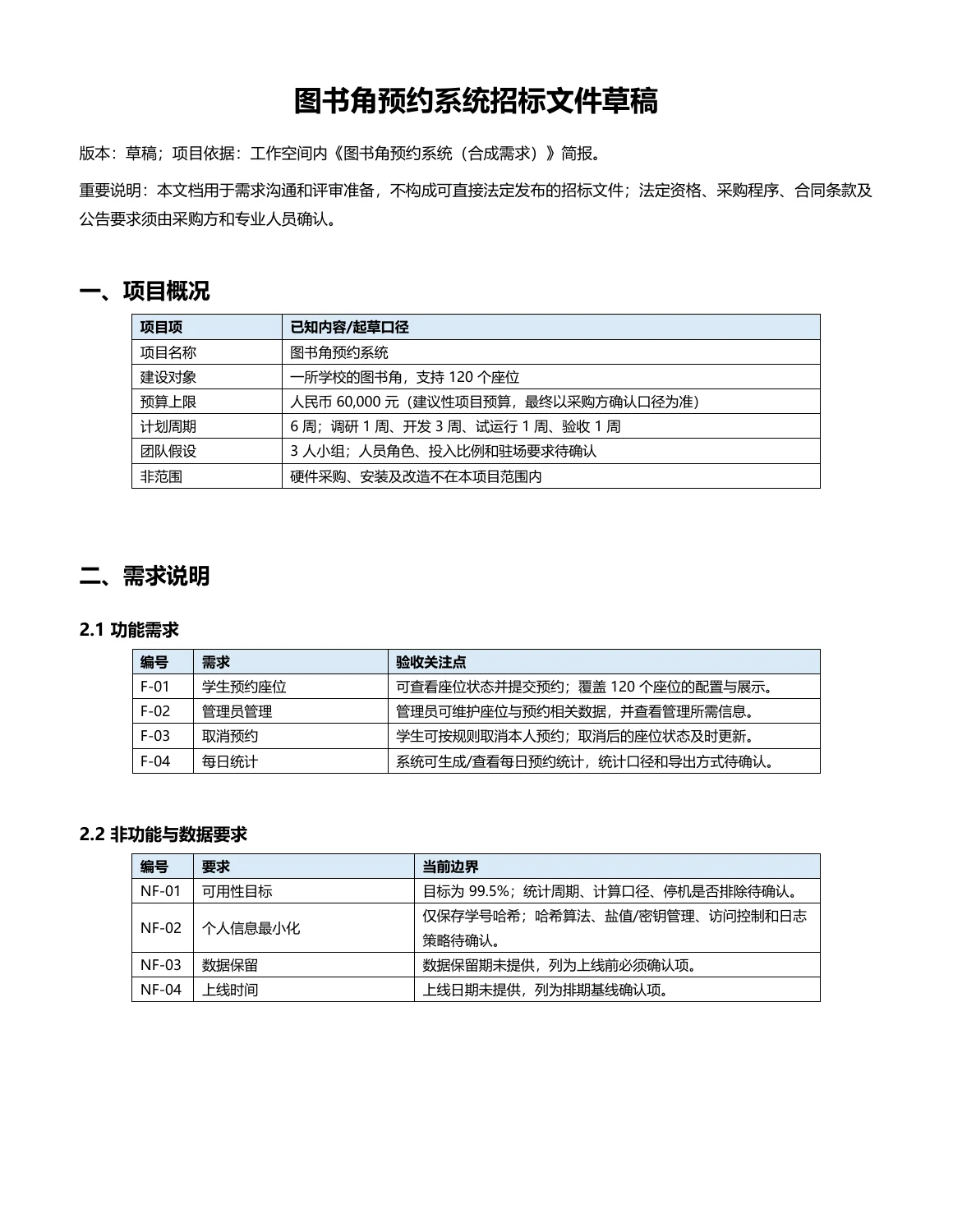
project-brief.md: a library-corner booking system for 120 seats; student booking, administrator management, cancellation, and daily statistics; budget RMB 60,000; six-week plan; three-person team; hardware out of scope; 99.5% availability target; only hashed student IDs are to be stored; data retention and go-live date remain to be confirmed. - Read
ENVIRONMENT.md: Windows environment withpython-docxand related document-generation dependencies available.
Processing Steps
- Inspected the workspace and input files.
- Organized requirements, deliverables, six-week schedule, and qualification items pending confirmation.
- Allocated the budget as a proposed RMB 10,000 per week for six stages, totaling RMB 60,000, and marked this as a planning estimate rather than a payment term.
- Created a 100-point suggested scoring table and mirrored it in CSV.
- Generated the Word draft with
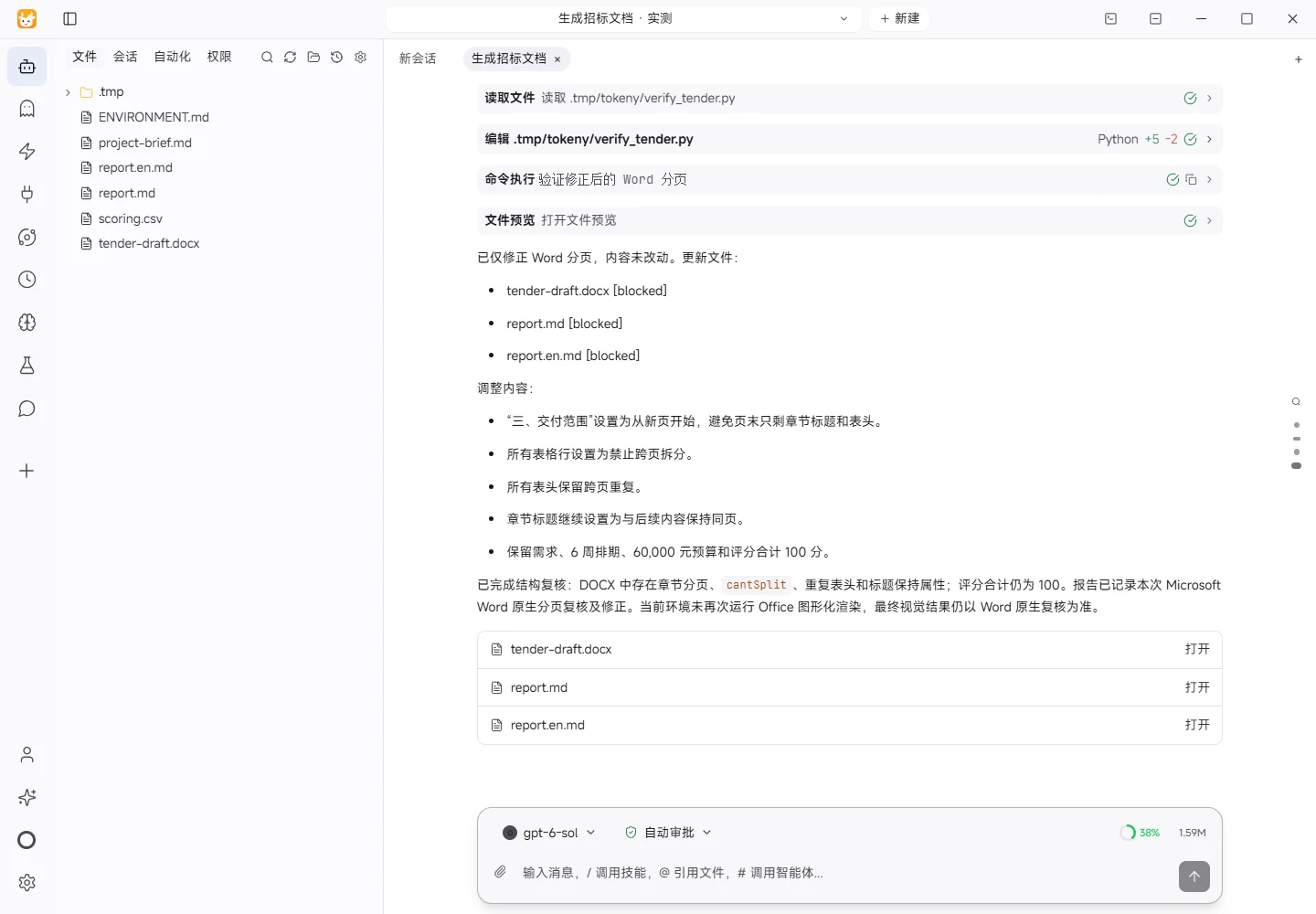
python-docx, then checked the DOCX XML and CSV for structure, scores, title, budget, and schedule consistency. - Based on the Microsoft Word native-pagination review feedback, adjusted pagination: Section 3 starts on a new page; all table rows cannot split; header rows repeat across pages; section headings stay with the following table.
Actual Results
- Generated
tender-draft.docx. - Generated
scoring.csv. - Generated
report.mdandreport.en.md.
Checks
- Re-read the CSV and checked that scoring rows total 100 and include a total row.
- Re-read the DOCX and checked that the title occurs once, is black, and that the document includes the RMB 60,000 budget, six-week schedule, hardware exclusion, and non-statutory-draft disclaimer.
- Checked that all six weekly stages exist and that the proposed weekly budget is RMB 10,000, totaling RMB 60,000.
- Checked that both reports are non-empty UTF-8 text.
Limitations and Items to Confirm
- The input is synthetic demonstration material and does not define applicable procurement rules, statutory qualification thresholds, tax treatment, payment terms, go-live date, data retention period, or detailed acceptance metrics. These were left as pending confirmations; no statutory qualification was invented.
- The pagination issue was identified in the user's Microsoft Word native-pagination review. The requested Word pagination properties have been applied, but Office rendering was not run again in this environment; final visual confirmation remains with the user's Word review.
scoring.csvis plain CSV rather than an Excel workbook; UTF-8 BOM and complete fields were used to reduce encoding issues and preserve long text, so Excel column-width/row-height checks are not applicable.- No HTML was generated in this task, so the 390px viewport overflow check is not applicable.
- No temporary service was started; no external recipient was contacted, and no publication, payment, or system-setting change was performed.
Download and inspect the outputs
The archive contains the files created during this run. Use these checks when adapting the example to your own data.
- Reconcile the reported results against the downloadable sample inputs.
- Open the generated files and check the contents relevant to your task.
- Review the limitations and any unverified steps in the report.