Industry Trend Research: a Tokeny case study
Conduct multi-round searches and analysis around specific industries, outputting data-backed trend reports. Follow the recorded task, execution screenshots, actual files and verification notes.
By the Tokeny team · Windows · Tokeny 1.7.8 · gpt-6-sol
Prepare the inputs
Create a separate workspace in Tokeny, download and unpack the sample inputs, then select a model that supports tools. The sample uses synthetic data or the public sources named in the article.
- sources.txt
Send the task to Tokeny
The original task was executed in Chinese. Copying these instructions reproduces the same task; the results below include an English report.
研究浏览器原生 AI 能力的发展,用官方公开网页取证,至少读取两个实际网页。按已发布、实验性与限制分类,记录访问日期和来源;无法读取就如实写明。

交付文件:research.md、sources.csv。
验收要点:
- 实际获取至少两页并记录 URL
- 不把实验性能力当作普遍支持
- 结论可追溯来源
这是使用合成演示输入或指定公开资料的真实操作案例。请先读取工作空间输入,再实际生成文件并自检。所有写入、脚本与临时服务限于当前工作空间;临时服务只监听 127.0.0.1,执行后关闭;不触达外部收件人、不发布、不付款、不更改系统设置,不调用子智能体。需要公开资料时可读取给定 URL。只启用完成任务必需的工具。另写 report.md(中文)和 report.en.md(英文),简洁、完整,包含输入、处理步骤、真实结果、检查方式和局限;失败或未验证部分如实记录,不能宣称成功。最终回复用中文列出产物、关键结果与待核实项。
The recorded run used an isolated demonstration workspace. Review the commands and file paths before approving operations in your own workspace.
What actually ran
The task was submitted through the Tokeny input box. An online model read the inputs and executed tools. Public sources are listed in the report, along with retrieval failures, missing information and scope.
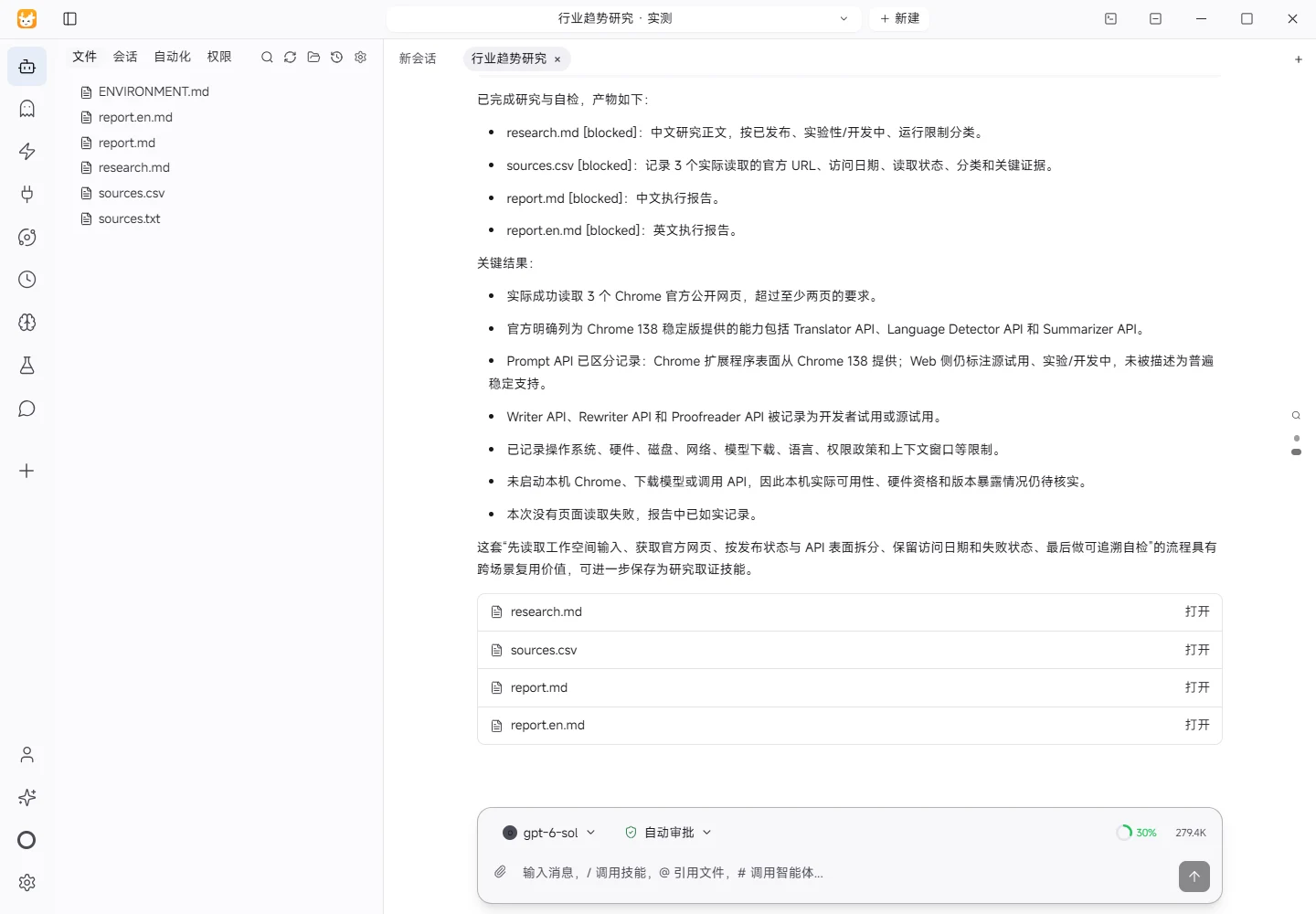
Results and verification
Input
- Workspace input:
sources.txtsuppliedhttps://developer.chrome.com/docs/ai/built-inandhttps://developer.chrome.com/docs/ai/prompt-api;ENVIRONMENT.mdspecified Windows and UTF-8 text handling. - Topic: development of browser-native AI capabilities, classified as released, experimental, and limitations.
- Access date: 2026-11-07 (Asia/Shanghai).
Processing Steps
- Read
ENVIRONMENT.md,sources.txt, and.tokeny/manifest.jsonfrom the workspace. - Retrieved both Chrome official pages listed in
sources.txt. - Retrieved the Chrome official API status page
https://developer.chrome.com/docs/ai/built-in-apisto cross-check release and trial status. - Classified capabilities by API surface and status, explicitly separating Chrome extensions from Web Prompt API.
- Wrote URLs, access dates, read status, and evidence to
sources.csv, and findings toresearch.md.
Actual Results
All three official webpages were retrieved successfully and returned page text. The sources state that Translator API, Language Detector API, and Summarizer API are available in stable Chrome starting with Chrome 138. They state that the Prompt API is available for Chrome extensions from Chrome 138, while the Web Prompt API page still describes the Web API as under development and includes trial/experimental status. Writer, Rewriter, and Proofreader remain in developer-trial or origin-trial stages. The official documentation also lists operating-system, hardware, disk, network, model-download, language, permissions, and context-window constraints.
Checks
- Checked that
sources.csvcontains three URLs, access dates, andread_status=已读取. - Checked that
research.mdcontains separate sections for released capabilities, experimental/development status, and runtime limitations. - Compared the findings against the official page text to ensure that Web Prompt API experimentation was not described as universal stable support, and that the extension/Web distinction was preserved.
- Checked that all four deliverables are non-empty UTF-8 text files.
Limitations and Unverified Items
This research only covers Chrome official materials and does not establish the status of Firefox, Safari, Edge, or other browsers. I did not launch Chrome locally, download a model, or call an API, so local hardware eligibility, browser-version availability, and actual API exposure were not verified. Official pages can change; findings should be rechecked using the recorded URLs and access date. No page failed to load in this run; if a future retrieval fails, the source record should state that failure rather than infer evidence.
Download and inspect the outputs
The archive contains the files created during this run. Use these checks when adapting the example to your own data.
- Reconcile the reported results against the downloadable sample inputs.
- Open the generated files and check the contents relevant to your task.
- Review the limitations and any unverified steps in the report.