Data Cleaning & Conversion: a Tokeny case study
Auto-clean messy data (dedup, fill gaps, unify formats) and convert between CSV / JSON / Excel. Follow the recorded task, execution screenshots, actual files and verification notes.
By the Tokeny team · Windows · Tokeny 1.7.8 · gpt-6-sol
Prepare the inputs
Create a separate workspace in Tokeny, download and unpack the sample inputs, then select a model that supports tools. The sample uses synthetic data or the public sources named in the article.
- dirty.csv
Send the task to Tokeny
The original task was executed in Chinese. Copying these instructions reproduces the same task; the results below include an English report.
按 id 去重,保留第一次记录,清理姓名和邮箱空格,统一日期为 ISO 格式;无效邮箱、缺失金额保留为空并记入问题表,输出 CSV、JSON、Excel。

交付文件:clean.csv、clean.json、clean.xlsx、issues.csv。
验收要点:
- 输出 3 个唯一 id
- 缺失金额未臆填
- 有去重与异常记录
这是使用合成演示输入或指定公开资料的真实操作案例。请先读取工作空间输入,再实际生成文件并自检。所有写入、脚本与临时服务限于当前工作空间;临时服务只监听 127.0.0.1,执行后关闭;不触达外部收件人、不发布、不付款、不更改系统设置,不调用子智能体。需要公开资料时可读取给定 URL。只启用完成任务必需的工具。另写 report.md(中文)和 report.en.md(英文),简洁、完整,包含输入、处理步骤、真实结果、检查方式和局限;失败或未验证部分如实记录,不能宣称成功。最终回复用中文列出产物、关键结果与待核实项。
Follow-up instructions after review (1)
独立渲染发现 clean.xlsx 使用默认窄列,完整邮箱和问题说明被截断。请调整 clean 和 issues 的列宽、长文字换行及行高,增加清晰表头,保留空邮箱与空金额,不改变实际清洗结果。更新双语报告,不要求固定字数。
The recorded run used an isolated demonstration workspace. Review the commands and file paths before approving operations in your own workspace.
What actually ran
The task was submitted through the Tokeny input box. An online model read the inputs and executed tools. This run covers the local sample task and its actual files. Results and checks are recorded below.
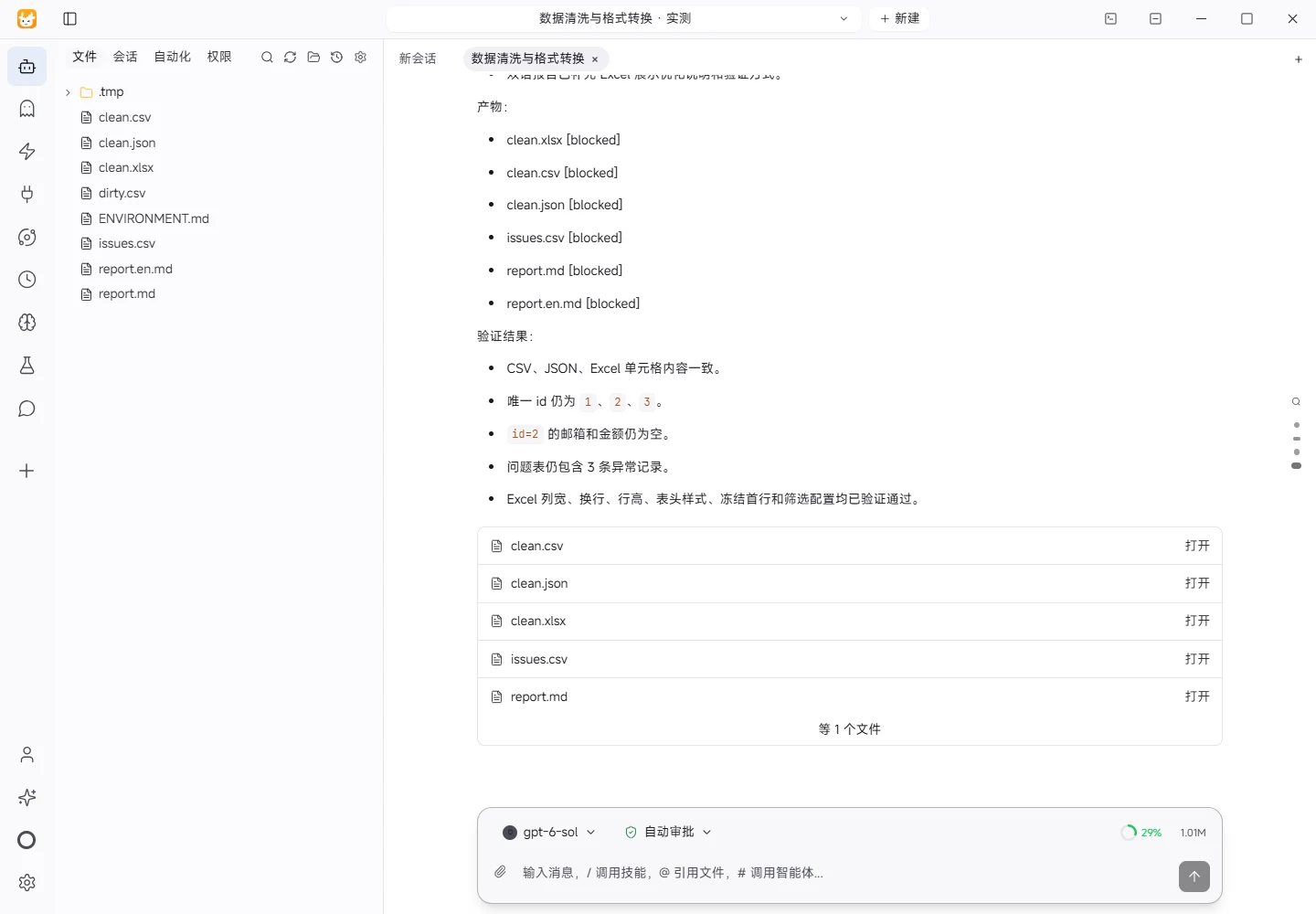

Results and verification
Input
- File:
dirty.csv - Actually read: 4 non-empty data rows with fields
id,name,email,date, andamount. id=1appears twice; the trailing blank line was ignored.
Processing Steps
- Deduplicated by
id, keeping the first occurrence; duplicate rows were recorded inissues.csv. - Trimmed leading and trailing spaces from names and emails.
- Normalized dates such as
2026/10/01and2026-10-02to ISOYYYY-MM-DDformat. - Validated email syntax; invalid emails were blanked and recorded in the issues table.
- Kept missing amounts blank without inference or filling, and recorded them in the issues table.
- Produced CSV, JSON, and Excel outputs; the Excel file contains
cleanandissuesworksheets.
Actual Results
- Clean table: 3 rows, with unique IDs
1,2, and3. - Blank values in the clean table:
emailandamountforid=2. - Issues table: 3 issues: one duplicate ID, one invalid email, and one missing amount.
- Normalized dates:
2026-10-01,2026-10-02, and2026-10-03.
Verification
- Reloaded
clean.csvandclean.jsonto check row count, unique IDs, blank amount handling, and ISO dates. - Reloaded
clean.xlsxwithopenpyxlto check worksheet names, row counts, and consistency with CSV/JSON. - Checked
clean.xlsxcolumn widths, header styling, text wrapping, row heights, frozen header row, and filters. - Reloaded
issues.csvto check issue types and counts.
Excel Presentation Improvements
- Widened the email column on
cleanand the issue-detail column onissuesso full values are readable instead of being truncated by default narrow columns. - Both worksheets now use clear dark headers, borders, top alignment, and wrapped text for long values.
- Set content-appropriate row heights, froze the header row, and enabled filters; the cleaned data itself was not changed.
Limitations
- Email validation uses a basic syntax rule; it does not verify domain existence, deliverability, or ownership.
- Non-empty amounts were retained as text; currency, precision, and business-range validation were not performed.
- The conclusions apply only to this 4-row non-empty input file.
Download and inspect the outputs
The archive contains the files created during this run. Use these checks when adapting the example to your own data.
- Reconcile the reported results against the downloadable sample inputs.
- Open the generated files and check the contents relevant to your task.
- Review the limitations and any unverified steps in the report.