Weekly/Monthly Reports: a Tokeny case study
Aggregate work data and progress to auto-generate structured weekly or monthly reports. Follow the recorded task, execution screenshots, actual files and verification notes.
By the Tokeny team · Windows · Tokeny 1.7.8 · gpt-6-sol
Prepare the inputs
Create a separate workspace in Tokeny, download and unpack the sample inputs, then select a model that supports tools. The sample uses synthetic data or the public sources named in the article.
- worklog.csv
Send the task to Tokeny
The original task was executed in Chinese. Copying these instructions reproduces the same task; the results below include an English report.
把零散工作记录整理为团队周报,区分完成、进行中、风险、下周计划,保留待确认事项。制作 Word 与 Markdown,并核对总工时。

交付文件:weekly-report.docx、weekly-report.md。
验收要点:
- 工时合计 33 小时
- 导出格式标为待确认
- 没有将进行中任务列为完成
这是使用合成演示输入或指定公开资料的真实操作案例。请先读取工作空间输入,再实际生成文件并自检。所有写入、脚本与临时服务限于当前工作空间;临时服务只监听 127.0.0.1,执行后关闭;不触达外部收件人、不发布、不付款、不更改系统设置,不调用子智能体。需要公开资料时可读取给定 URL。只启用完成任务必需的工具。另写 report.md(中文)和 report.en.md(英文),每份 400–800 字,包含输入、处理步骤、真实结果、检查方式和局限;失败或未验证部分如实记录,不能宣称成功。最终回复用中文列出产物、关键结果与待核实项。
Follow-up instructions after review (1)
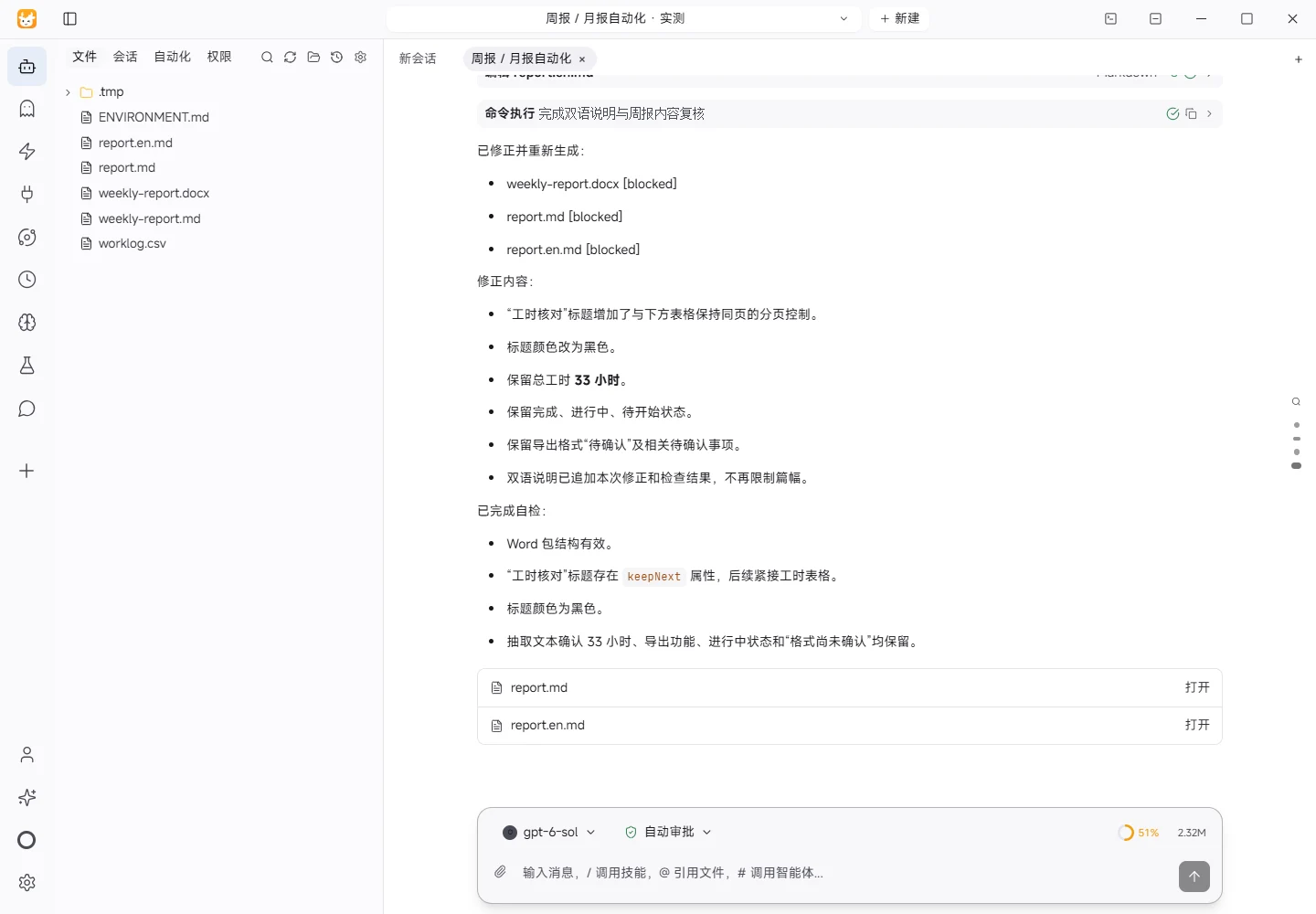
已用 Microsoft Word 原生渲染 weekly-report.docx,发现“工时核对”标题落在第一页末尾而表格在第二页。请修正孤立标题,让标题和对应表格保持同页,标题用黑色;保留正确的33小时和任务状态。同步简要更新双语 report,无需固定报告字数。
The recorded run used an isolated demonstration workspace. Review the commands and file paths before approving operations in your own workspace.
What actually ran
The task was submitted through the Tokeny input box. An online model read the inputs and executed tools. This run covers the local sample task and its actual files. Results and checks are recorded below.
Results and verification
Input
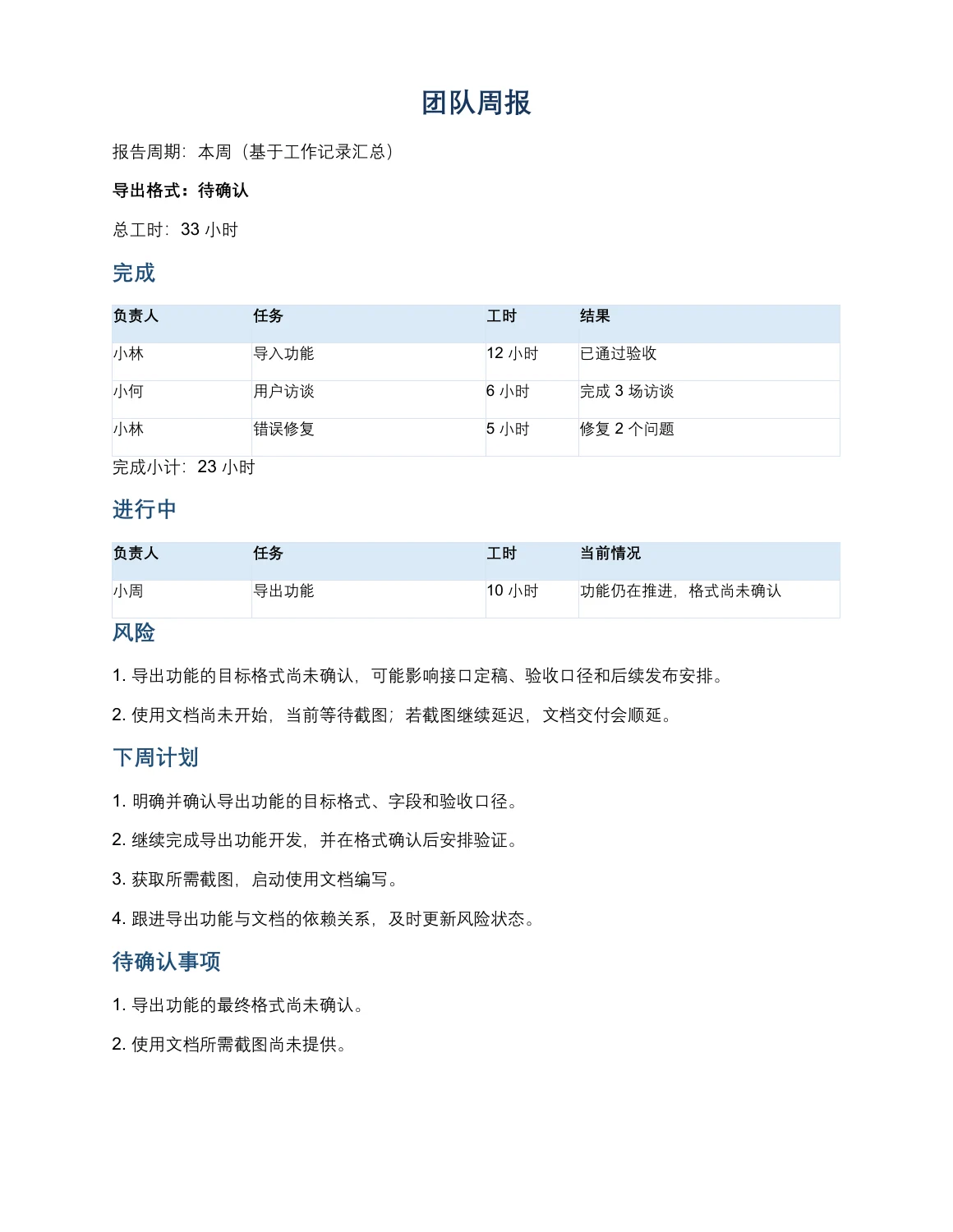
This task used only the files available in the current workspace: worklog.csv and ENVIRONMENT.md. The worklog has five effective fields: person, task, status, hours, and note. It contains six task rows. The documentation task is marked as not started and has zero recorded hours. The source entries report 12 hours for the import feature, 10 hours for the export feature, 6 hours for user interviews, 5 hours for bug fixing, and 0 hours for the user documentation task. ENVIRONMENT.md was used only to understand the test environment and available dependencies; it was not treated as a source of project facts.
Processing Steps
I first read the workspace files and ignored the trailing blank line after checking that it contained no record. I then preserved the original statuses, separating completed work, work in progress, and not-started work. Notes were used to identify acceptance evidence, open questions, risks, and dependencies. The report was organized into Completed, In Progress, Risks, Next Week Plan, Items to Confirm, and Hours Check. To avoid overstating progress, the export feature remains explicitly listed as In Progress even though it has ten recorded hours. Its note, “format not yet confirmed,” is retained as both an open confirmation item and a delivery risk. The documentation task is not presented as completed.
Actual Results
The requested deliverables were created: weekly-report.md and weekly-report.docx. The report lists three completed tasks, with a completed subtotal of 23 hours. The export feature appears in a separate In Progress section, while the documentation task remains Not Started. The full hours check is 12 + 10 + 6 + 5 + 0 = 33 hours. The report header labels the export format as “待确认” (to be confirmed), matching the requested acceptance condition. The unresolved items are the final export format and the screenshots needed for the user documentation.
Verification Method
I reviewed the Markdown content for each source status, person, task, note, and hours value, then recalculated the completed subtotal, in-progress hours, and total. I also validated the Word package structure and extracted its text to confirm that the title, key statuses, 33-hour total, and “导出格式:待确认” label are present. Finally, I checked that the export feature does not appear in the Completed table.
Limitations
The input does not provide an explicit calendar-week start and end date, candidate export formats, screenshot files, or additional acceptance records. Therefore, the report uses “This week (based on the worklog)” rather than claiming a formal date range. The Word file’s structure and text were checked, but this test did not include printed output or visual comparison across different Office versions. Before formal distribution, the owner should confirm the reporting period, export format, and screenshot dependency.
This Revision
Based on the native Microsoft Word rendering feedback, the “工时核对” heading was updated to stay with its corresponding hours table on the same page, and its font color was changed to black. A follow-up check confirmed that the 33-hour total, the Completed/In Progress/Not Started statuses, and the export-format label “待确认” were preserved. The heading is immediately followed by the hours table in the document structure.
Download and inspect the outputs
The archive contains the files created during this run. Use these checks when adapting the example to your own data.
- Reconcile the reported results against the downloadable sample inputs.
- Open the generated files and check the contents relevant to your task.
- Review the limitations and any unverified steps in the report.