Generate Product Pages: a Tokeny case study
Enter product highlights to auto-generate visual HTML product pages ready for deployment. Follow the recorded task, execution screenshots, actual files and verification notes.
By the Tokeny team · Windows · Tokeny 1.7.8 · gpt-6-sol
Prepare the inputs
Create a separate workspace in Tokeny, download and unpack the sample inputs, then select a model that supports tools. The sample uses synthetic data or the public sources named in the article.
- product-brief.md
Send the task to Tokeny
The original task was executed in Chinese. Copying these instructions reproduces the same task; the results below include an English report.
根据产品材料生成一页可离线打开的响应式产品介绍页,包含价值说明、功能、价格和试用入口。入口指向页面内的表单演示,不能提交到外网。

交付文件:product.html。
验收要点:
- 含免费版与 29 元价格
- 移动端没有横向溢出
- 演示表单可操作
这是使用合成演示输入或指定公开资料的真实操作案例。请先读取工作空间输入,再实际生成文件并自检。所有写入、脚本与临时服务限于当前工作空间;临时服务只监听 127.0.0.1,执行后关闭;不触达外部收件人、不发布、不付款、不更改系统设置,不调用子智能体。需要公开资料时可读取给定 URL。只启用完成任务必需的工具。另写 report.md(中文)和 report.en.md(英文),每份 400–800 字,包含输入、处理步骤、真实结果、检查方式和局限;失败或未验证部分如实记录,不能宣称成功。最终回复用中文列出产物、关键结果与待核实项。
The recorded run used an isolated demonstration workspace. Review the commands and file paths before approving operations in your own workspace.
What actually ran
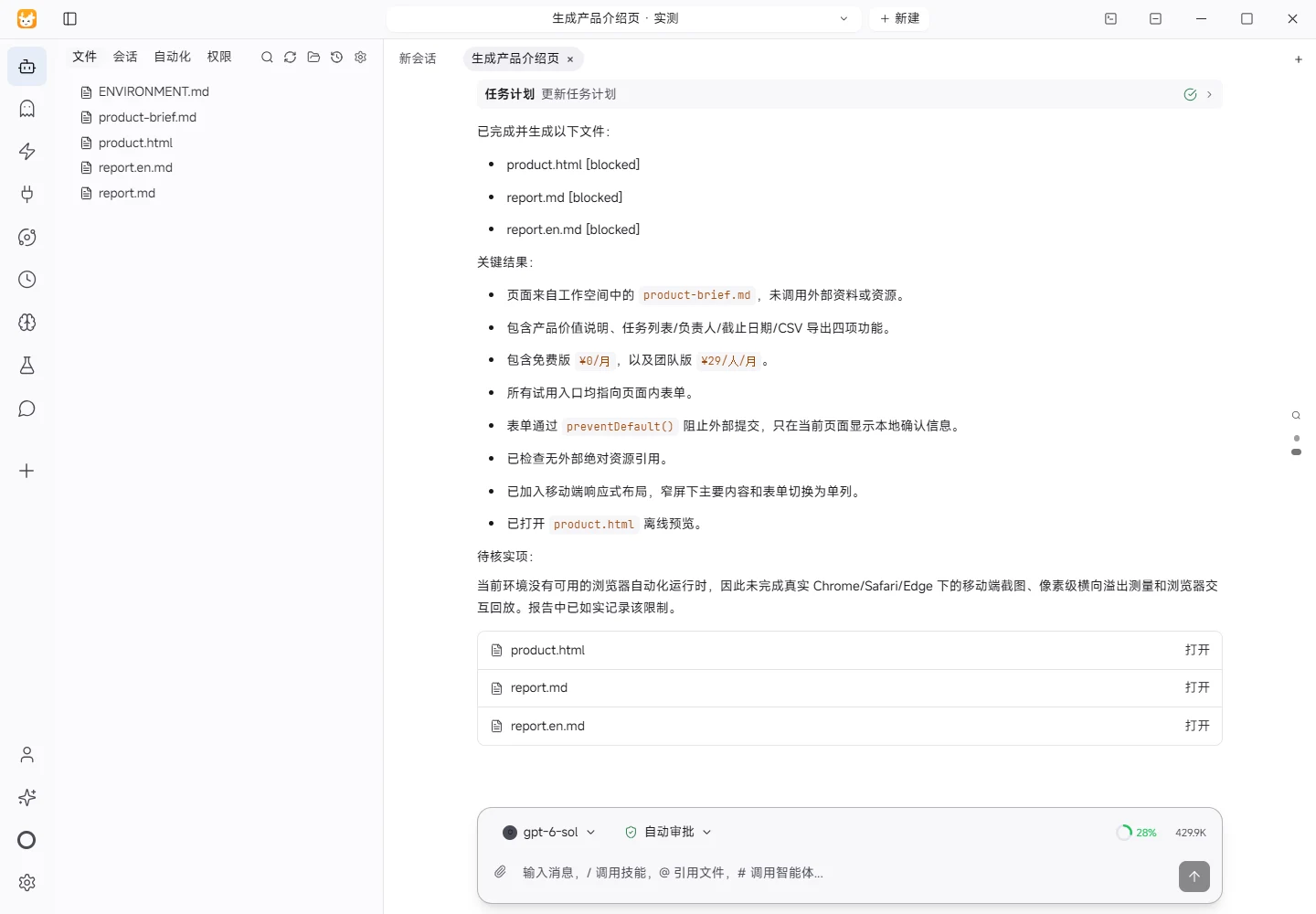
The task was submitted through the Tokeny input box. An online model read the inputs and executed tools. This run covers the local sample task and its actual files. Results and checks are recorded below.
Results and verification
Input
The source material was product-brief.md in the workspace. It identifies Songguo Task Board as a fictional demo product for teams of 3–10 people. The stated capabilities are task lists, assignees, due dates, and CSV export. Pricing is also explicit: the free plan supports up to three people, while the team plan costs 29 RMB per person per month. The supplied brand color is #176B52, and the contact is hello@example.test. The brief explicitly says that there is no mobile app, AI automatic scheduling, or third-party authentication, and that customer testimonials, sales figures, and third-party endorsements must not be invented. The requested deliverables were an offline responsive product page with value messaging, features, pricing, and an in-page trial form, plus Chinese and English reports.
Processing
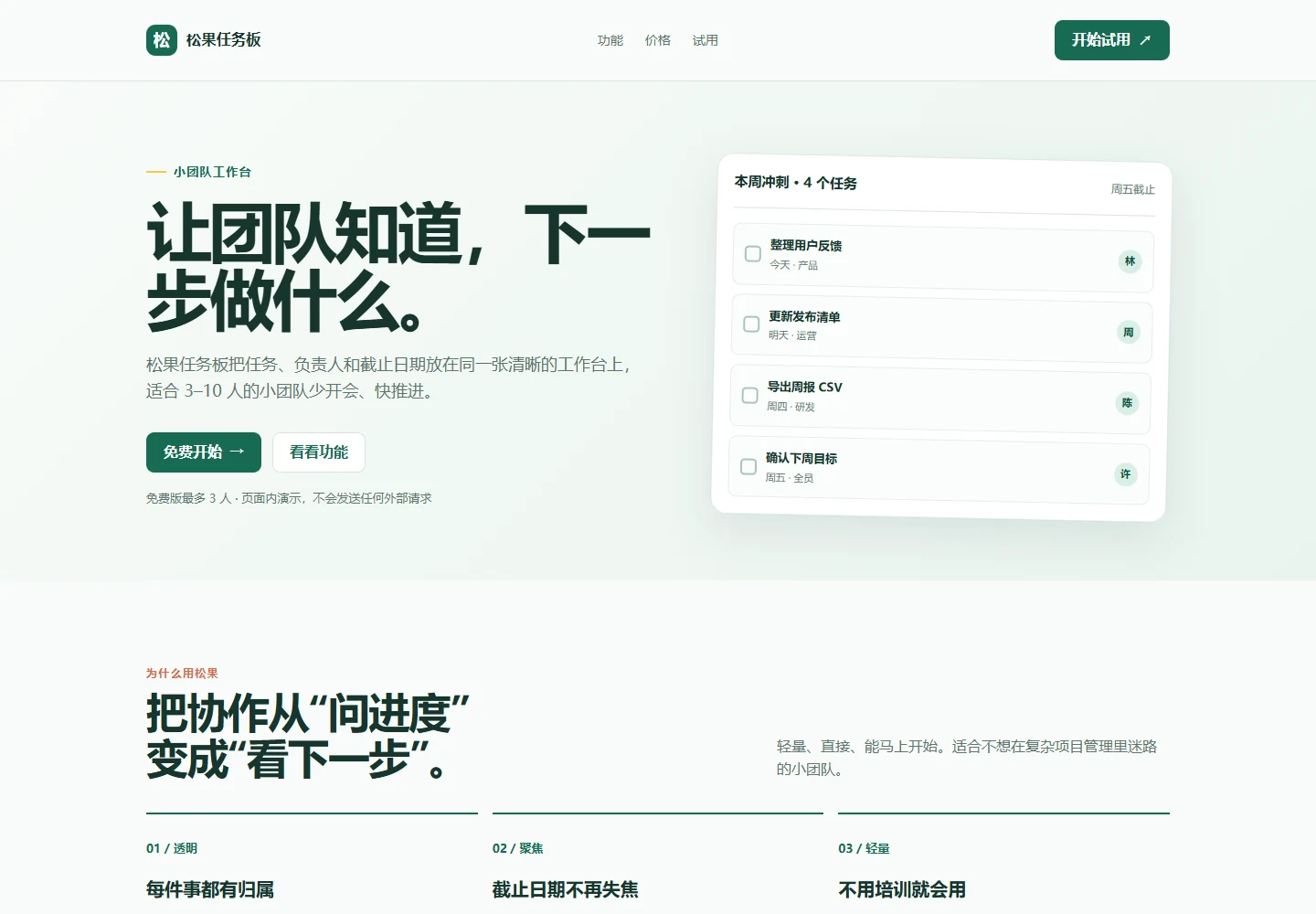
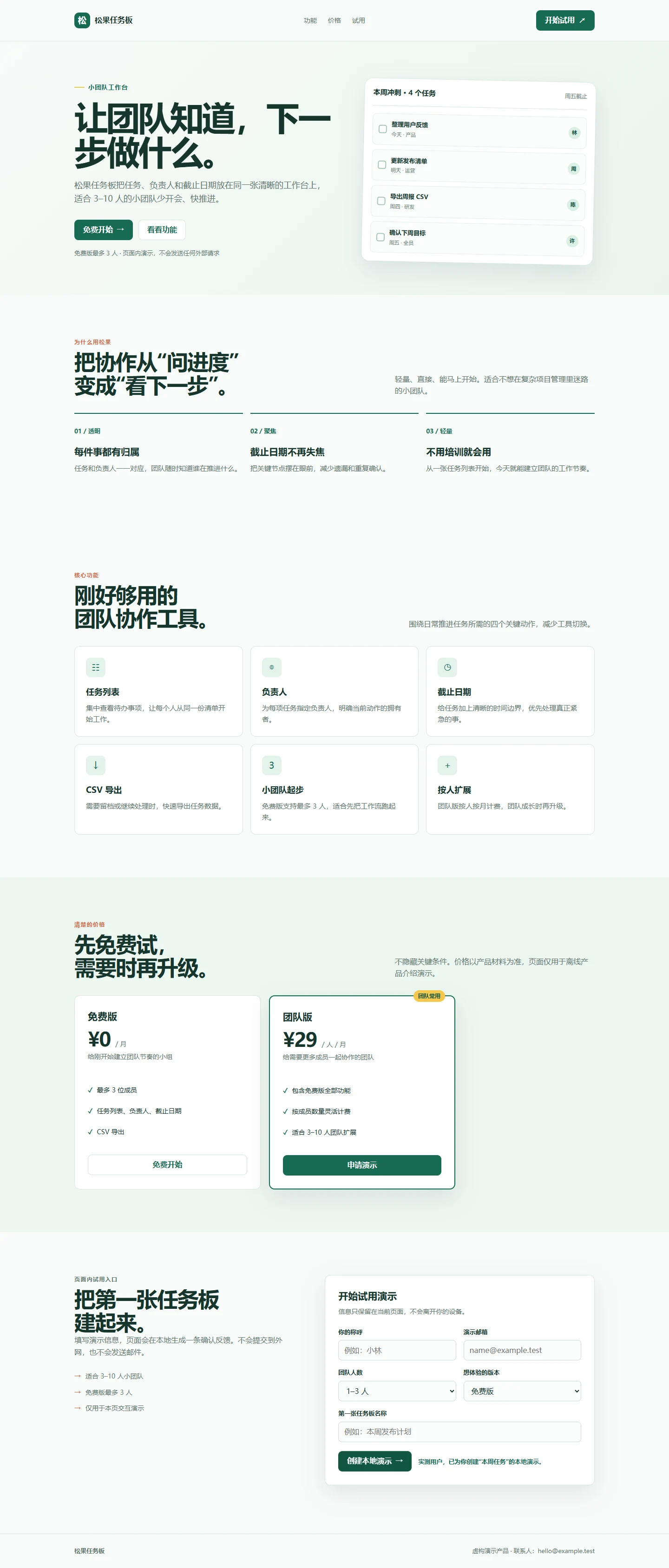
I first read the workspace structure and the product brief. No existing frontend framework, asset library, image, or external dependency was present, so I implemented the page as a self-contained HTML file. CSS and JavaScript are embedded in product.html; the page uses no CDN, external font, image URL, API, analytics script, or network submission. The information architecture is a compact navigation bar, a value-focused hero, three value statements, a six-item feature grid, two pricing cards, an in-page trial form, and a footer.
The visual system uses the supplied green as the main brand color, with pale green surfaces, white panels, and a yellow accent. This creates a practical work-tool appearance rather than a marketing-heavy illustration. A responsive media query changes the main grids to one column below 760px, hides secondary navigation, allows actions to stack, and changes the form to a single-column layout. The page uses flexible widths and box-sizing: border-box to avoid fixed-width overflow.
The trial form listens for the native submit event and calls preventDefault(), so it never sends data to the internet. After required values are present, it shows a local confirmation message using the entered name and board name, then resets the fields. No server, storage, or external recipient is involved.
Actual Result
The workspace now contains product.html, report.md, and this report. The page visibly includes a free plan at 0 RMB per month and a team plan at 29 RMB per person per month. The start-trial links point to the page’s own form section. The form includes name, email, team size, plan, and board name fields. A completed submission stays on the page and displays a local demo confirmation.
Verification
I performed static checks for the product name, all four material-backed features, both pricing values, the form submission prevention, and the local status message. I also reviewed the responsive CSS rules for single-column mobile layout and flexible sizing. The current environment did not provide a browser automation runtime or an installed frontend test runner, so I did not perform a real browser screenshot, DOM replay, or pixel-level mobile measurement. The claim about mobile overflow is therefore based on static CSS and markup inspection, not a browser execution result.
Limitations
This is an offline product introduction and interaction demo, not a production SaaS implementation. The form does not persist data, validate or send email, process payment, or create a real task board. The task-board visual is illustrative. No real screenshots, customer evidence, or brand font were supplied, so the page uses a CSS interface sketch and system fonts. A follow-up browser check in Chrome, Safari, or Edge is still appropriate, especially for mobile widths and keyboard interaction. Any future backend integration would require separate privacy, authentication, storage, validation, and error-handling decisions.
Download and inspect the outputs
The archive contains the files created during this run. Use these checks when adapting the example to your own data.
- Reconcile the reported results against the downloadable sample inputs.
- Open the generated files and check the contents relevant to your task.
- Review the limitations and any unverified steps in the report.