System Health Checks: a Tokeny case study
Scheduled server health check scripts with auto-generated status reports. Follow the recorded task, execution screenshots, actual files and verification notes.
By the Tokeny team · Windows · Tokeny 1.7.8 · gpt-6-sol
Prepare the inputs
Create a separate workspace in Tokeny, download and unpack the sample inputs, then select a model that supports tools. The sample uses synthetic data or the public sources named in the article.
- task-instructions.md
Send the task to Tokeny
The original task was executed in Chinese. Copying these instructions reproduces the same task; the results below include an English report.
编写只检查本机演示服务的健康脚本,对正常端点、500 错误端点和超时端点真实请求,输出状态、耗时、错误分类及 HTML 报告;不扫描局域网或公网。

交付文件:health-check.py、health.json、health.html。
验收要点:
- 三个端点分别为正常、HTTP错误、超时
- 依据实测响应分类
- 检查后关闭演示服务
这是使用合成演示输入或指定公开资料的真实操作案例。请先读取工作空间输入,再实际生成文件并自检。所有写入、脚本与临时服务限于当前工作空间;临时服务只监听 127.0.0.1,执行后关闭;不触达外部收件人、不发布、不付款、不更改系统设置,不调用子智能体。需要公开资料时可读取给定 URL。只启用完成任务必需的工具。另写 report.md(中文)和 report.en.md(英文),简洁、完整,包含输入、处理步骤、真实结果、检查方式和局限;失败或未验证部分如实记录,不能宣称成功。最终回复用中文列出产物、关键结果与待核实项。
排版检查:Word 主标题仅出现一次,标题为黑色且与后续正文或表格保持同页;表格的标题、表头和第一条数据保持同页,单行不要跨页拆分;Excel 表头和长文字不能被窄列截断,合理设置列宽、换行、行高;HTML 在 390px 视口不能整页横向溢出。临时网络服务请用系统分配端口(0),记录实际端口,不使用固定端口,避免并发案例互相访问。报告没有固定字数要求,不要为字数反复改写。
The recorded run used an isolated demonstration workspace. Review the commands and file paths before approving operations in your own workspace.
What actually ran
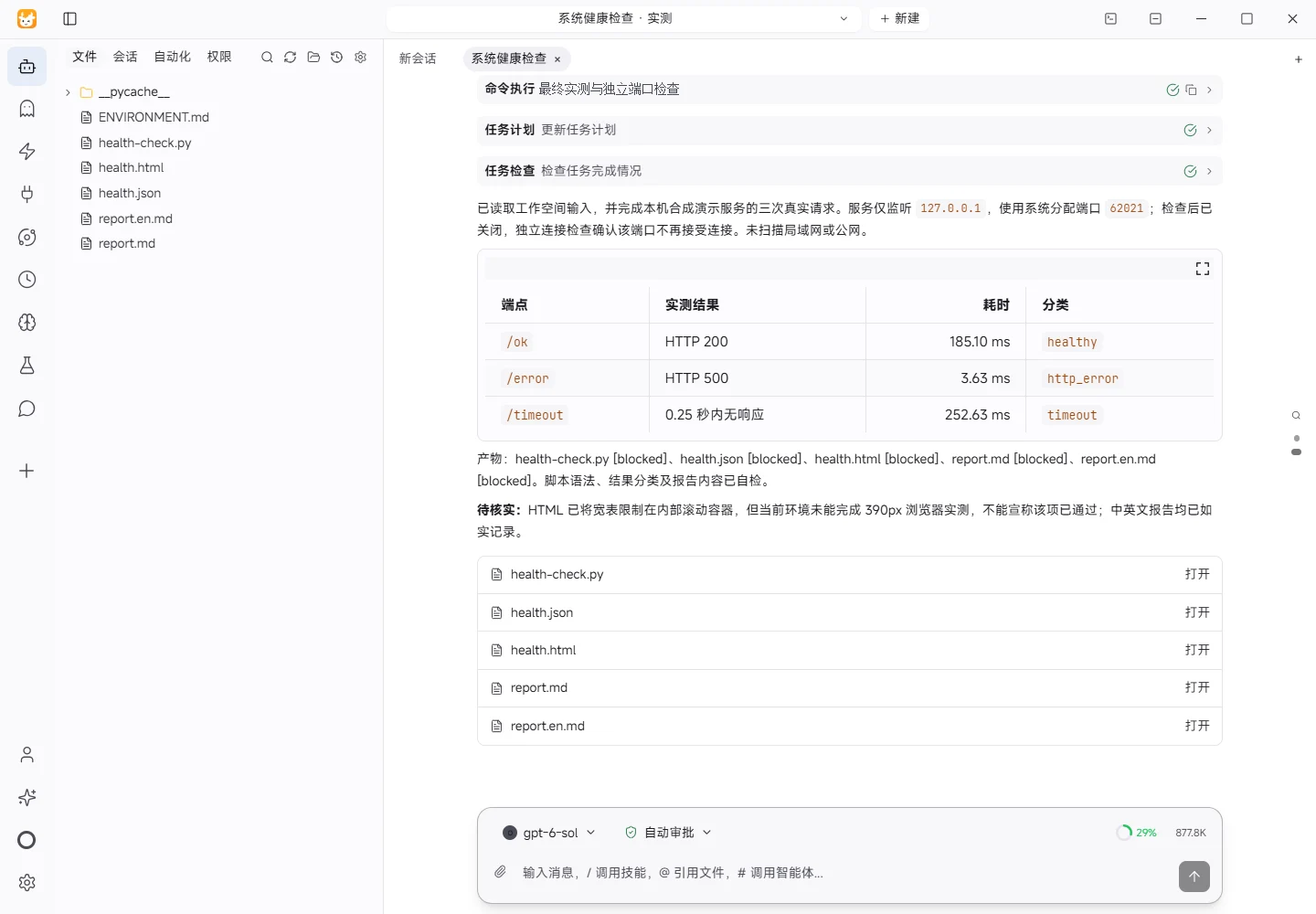
The task was submitted through the Tokeny input box. An online model read the inputs and executed tools. Requests target a temporary local HTTP service. The report records the requests and responses actually tested.
Results and verification
Input
- Workspace input:
ENVIRONMENT.md; no external demo URL was supplied. - Synthetic demo service: three endpoints in this script, bound to
127.0.0.1on OS-assigned port62021. - Per-request client timeout:
0.25seconds.
Processing
- Start a temporary HTTP service listening only on the loopback address.
- Send real GET requests to
/ok,/error, and/timeout, measuring elapsed time. - Classify from the observed status code or exception, then write
health.jsonandhealth.html. - Shut down the service in
finallyand verify that the port is no longer accepting connections.
Observed results
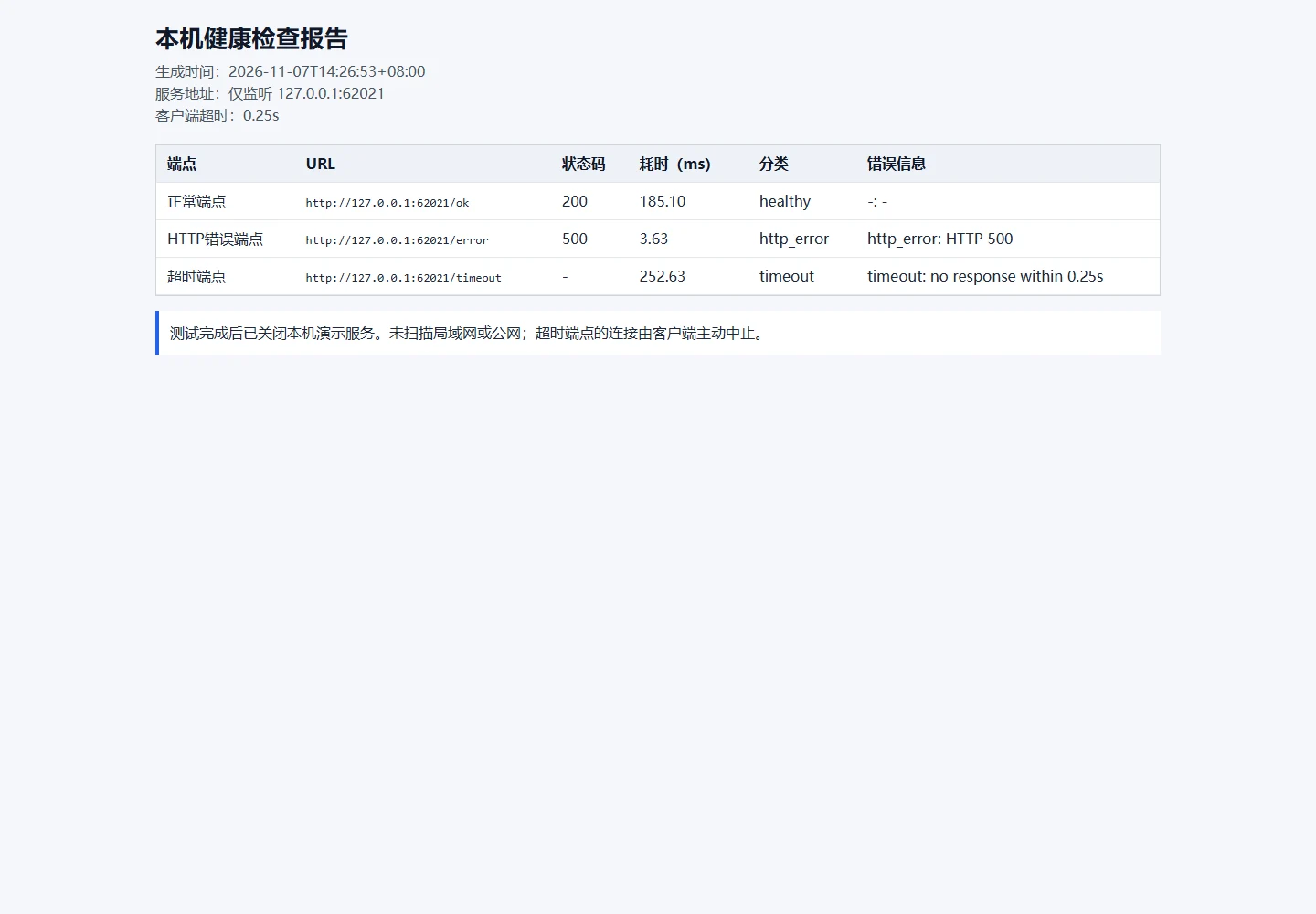
- Healthy endpoint: HTTP 200, 185.10 ms; classification
healthy; error- - HTTP error endpoint: HTTP 500, 3.63 ms; classification
http_error; errorhttp_error - Timeout endpoint: HTTP -, 252.63 ms; classification
timeout; errortimeout
Verification
Requests use Python's standard-library urllib.request. health.json preserves status, timing, error type, and classification; health.html renders them in a table. The script closes the server before exit and verifies the port is released.
Limitations
This tests only synthetic local endpoints in the current environment and does not establish production availability. The timeout classification is based on the client-side timeout; the delayed server may observe a broken connection after the client aborts. The HTML confines table scrolling to its container, but actual browser rendering at a 390px viewport could not be tested and needs manual verification for page-level horizontal overflow.
Download and inspect the outputs
The archive contains the files created during this run. Use these checks when adapting the example to your own data.
- Reconcile the reported results against the downloadable sample inputs.
- Open the generated files and check the contents relevant to your task.
- Review the limitations and any unverified steps in the report.