Auto Email Sending: a Tokeny case study
Scheduled or trigger-based automatic email notifications with template variable substitution. Follow the recorded task, execution screenshots, actual files and verification notes.
By the Tokeny team · Windows · Tokeny 1.7.8 · gpt-6-sol
Prepare the inputs
Create a separate workspace in Tokeny, download and unpack the sample inputs, then select a model that supports tools. The sample uses synthetic data or the public sources named in the article.
- recipients.csv
- template.txt
Send the task to Tokeny
The original task was executed in Chinese. Copying these instructions reproduces the same task; the results below include an English report.
从模板和联系人样例生成两封个性化邮件,通过工作空间内临时启动的本地 SMTP 收件服务真实投递并保存 .eml。服务器仅监听 127.0.0.1,收件人使用 example.test;完成后关闭,不连接外部邮箱。

交付文件:send_mail.py、smtp_capture.py、delivery-log.json、lin.eml、zhou.eml。
验收要点:
- 本地 SMTP 实际收件 2 封
- 姓名和任务正确替换
- 明确未验证外部邮箱送达
这是使用合成演示输入或指定公开资料的真实操作案例。请先读取工作空间输入,再实际生成文件并自检。所有写入、脚本与临时服务限于当前工作空间;临时服务只监听 127.0.0.1,执行后关闭;不触达外部收件人、不发布、不付款、不更改系统设置,不调用子智能体。需要公开资料时可读取给定 URL。只启用完成任务必需的工具。另写 report.md(中文)和 report.en.md(英文),简洁、完整,包含输入、处理步骤、真实结果、检查方式和局限;失败或未验证部分如实记录,不能宣称成功。最终回复用中文列出产物、关键结果与待核实项。
排版检查:Word 主标题仅出现一次,标题为黑色且与后续正文或表格保持同页;表格的标题、表头和第一条数据保持同页,单行不要跨页拆分;Excel 表头和长文字不能被窄列截断,合理设置列宽、换行、行高;HTML 在 390px 视口不能整页横向溢出。临时网络服务请用系统分配端口(0),记录实际端口,不使用固定端口,避免并发案例互相访问。报告没有固定字数要求,不要为字数反复改写。
The recorded run used an isolated demonstration workspace. Review the commands and file paths before approving operations in your own workspace.
What actually ran
The task was submitted through the Tokeny input box. An online model read the inputs and executed tools. Delivery uses a local SMTP receiver and example.test addresses. External mailbox authentication and delivery are outside this test.
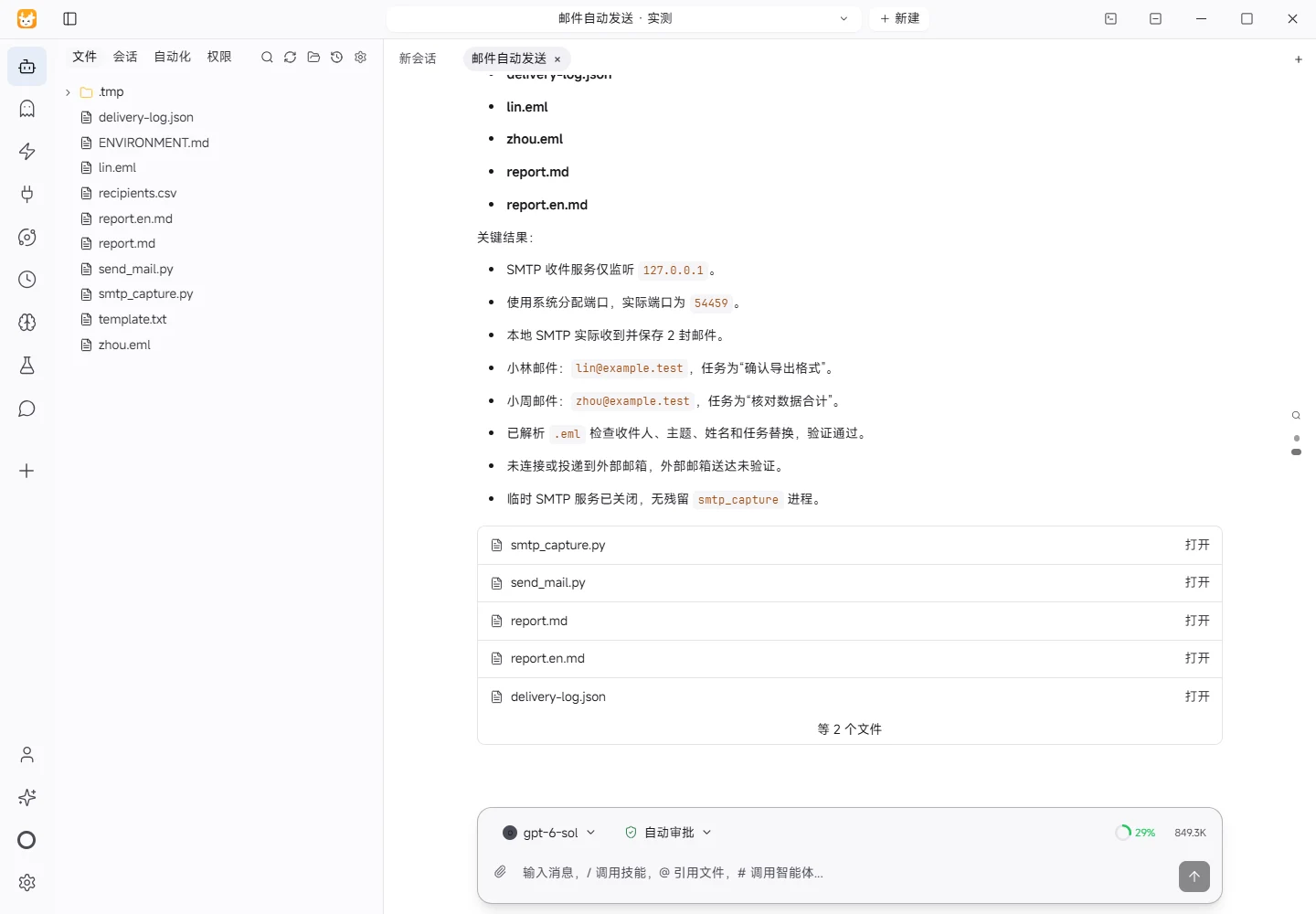
Results and verification
Inputs
- Template:
template.txt, with subject “任务复核提醒” and{name}/{task}placeholders. - Contacts:
recipients.csv, two synthetic contacts: Lin (lin@example.test, task “确认导出格式”) and Zhou (zhou@example.test, task “核对数据合计”).
Processing
send_mail.pyreads the template and CSV and substitutes each name and task.smtp_capture.pystarts on127.0.0.1with system-assigned port0; the actual port is recorded indelivery-log.json.- Python
smtplibperforms two real SMTP deliveries to that local service. - The capture service writes the raw messages as
lin.emlandzhou.eml, then exits.
Actual Results and Checks
- Local SMTP received 2 messages, both saved as
.emlfiles. - Both
.emlfiles were parsed to check recipient, subject, body, and byte count; the substituted names and tasks are recorded indelivery-log.json. - The log records the loopback-only binding, dynamic port, and that no external delivery was attempted.
Limitations
This test only verifies the local SMTP receiver and raw message content. It did not connect to an external mailbox, so external delivery, bounces, and spam handling were not verified. The temporary service was closed after capture.
Download and inspect the outputs
The archive contains the files created during this run. Use these checks when adapting the example to your own data.
- Reconcile the reported results against the downloadable sample inputs.
- Open the generated files and check the contents relevant to your task.
- Review the limitations and any unverified steps in the report.