Business Plan Generation: a Tokeny case study
Auto-generate complete business plan documents from business model canvas to financial projections. Follow the recorded task, execution screenshots, actual files and verification notes.
By the Tokeny team · Windows · Tokeny 1.7.8 · gpt-6-sol
Prepare the inputs
Create a separate workspace in Tokeny, download and unpack the sample inputs, then select a model that supports tools. The sample uses synthetic data or the public sources named in the article.
- product-brief.md
Send the task to Tokeny
The original task was executed in Chinese. Copying these instructions reproduces the same task; the results below include an English report.
生成一份精简 Word 商业计划书与 12 个月财务模型。假设为 100 名起始付费用户,每月增加 20 人、月流失 5%、客单价 29 元、月固定成本 8000 元;写清假设和计算口径。

交付文件:business-plan.docx、forecast.xlsx。
验收要点:
- 12 个月模型包含公式
- 区分收入、成本、现金需求
- 财务数字标注为假设预测
这是使用合成演示输入或指定公开资料的真实操作案例。请先读取工作空间输入,再实际生成文件并自检。所有写入、脚本与临时服务限于当前工作空间;临时服务只监听 127.0.0.1,执行后关闭;不触达外部收件人、不发布、不付款、不更改系统设置,不调用子智能体。需要公开资料时可读取给定 URL。只启用完成任务必需的工具。另写 report.md(中文)和 report.en.md(英文),简洁、完整,包含输入、处理步骤、真实结果、检查方式和局限;失败或未验证部分如实记录,不能宣称成功。最终回复用中文列出产物、关键结果与待核实项。
排版检查:Word 主标题仅出现一次,标题为黑色且与后续正文或表格保持同页;Excel 表头和长文字不能被窄列截断,合理设置列宽、换行、行高;HTML 在 390px 视口不能整页横向溢出。报告没有固定字数要求,不要为字数反复改写。
Follow-up instructions after review (1)
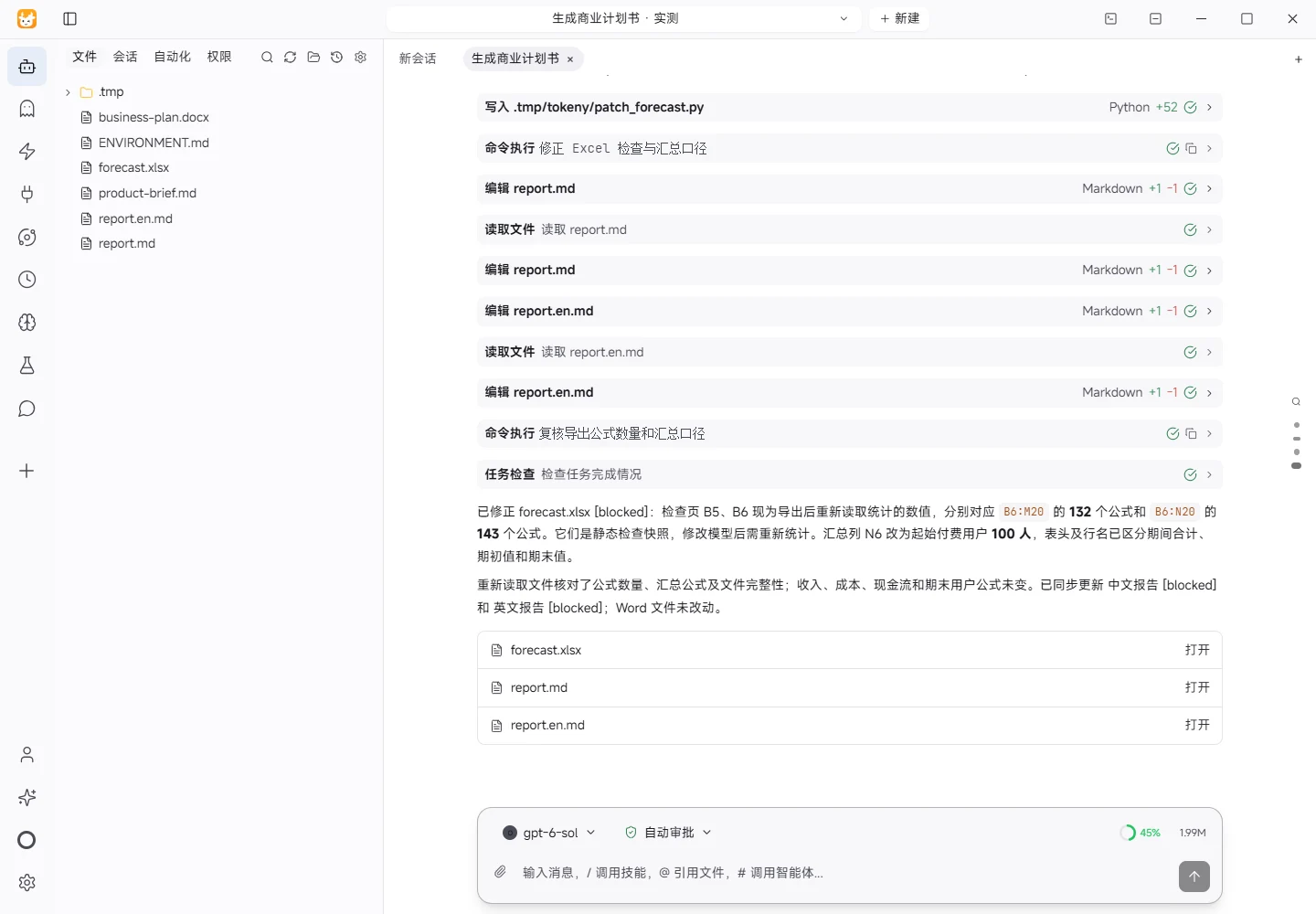
独立重算发现 forecast.xlsx 的“检查”B5 使用 COUNTIF(...,"=*"),结果为 0;这按计算值匹配,不能统计公式。请改为真实可复核的公式数量,注明统计范围(B6:M20 实际为 132 个,整个模型页为 143 个);可在导出后用 openpyxl 重新读取统计并将数值写入检查页,不必增加复杂 Excel 公式。另外,“12个月模型”N6 将各月期初人数相加为 1986,容易误读为全年人数,请改为期初 100 或不适用,并将汇总列表头/说明明确区分期间合计与期末值,保持收入、成本、现金流和期末用户计算不变。只修正这两个问题及必要报告说明。
The recorded run used an isolated demonstration workspace. Review the commands and file paths before approving operations in your own workspace.
What actually ran
The task was submitted through the Tokeny input box. An online model read the inputs and executed tools. This run covers the local sample task and its actual files. Results and checks are recorded below.
Results and verification
Inputs
- Workspace input:
product-brief.md. The product is “松果任务板” (a fictional demo product) for 3–10 person teams. The team plan is 29 yuan per seat per month. The free plan supports up to 3 people. There is no mobile app, AI scheduling, or third-party authentication. - Model parameters: 100 starting paid users; 20 new users per month; 5% monthly churn; 29 yuan per user per month; 8,000 yuan monthly fixed cost.
Processing Steps
- Read the workspace input and environment notes.
- Generated
forecast.xlsxwith three sheets: Assumptions, 12-Month Model, and Checks. Inputs are placed in blue editable cells. Formulas calculate users, revenue, costs, net cash flow, cumulative cash flow, and minimum opening cash required. - Generated
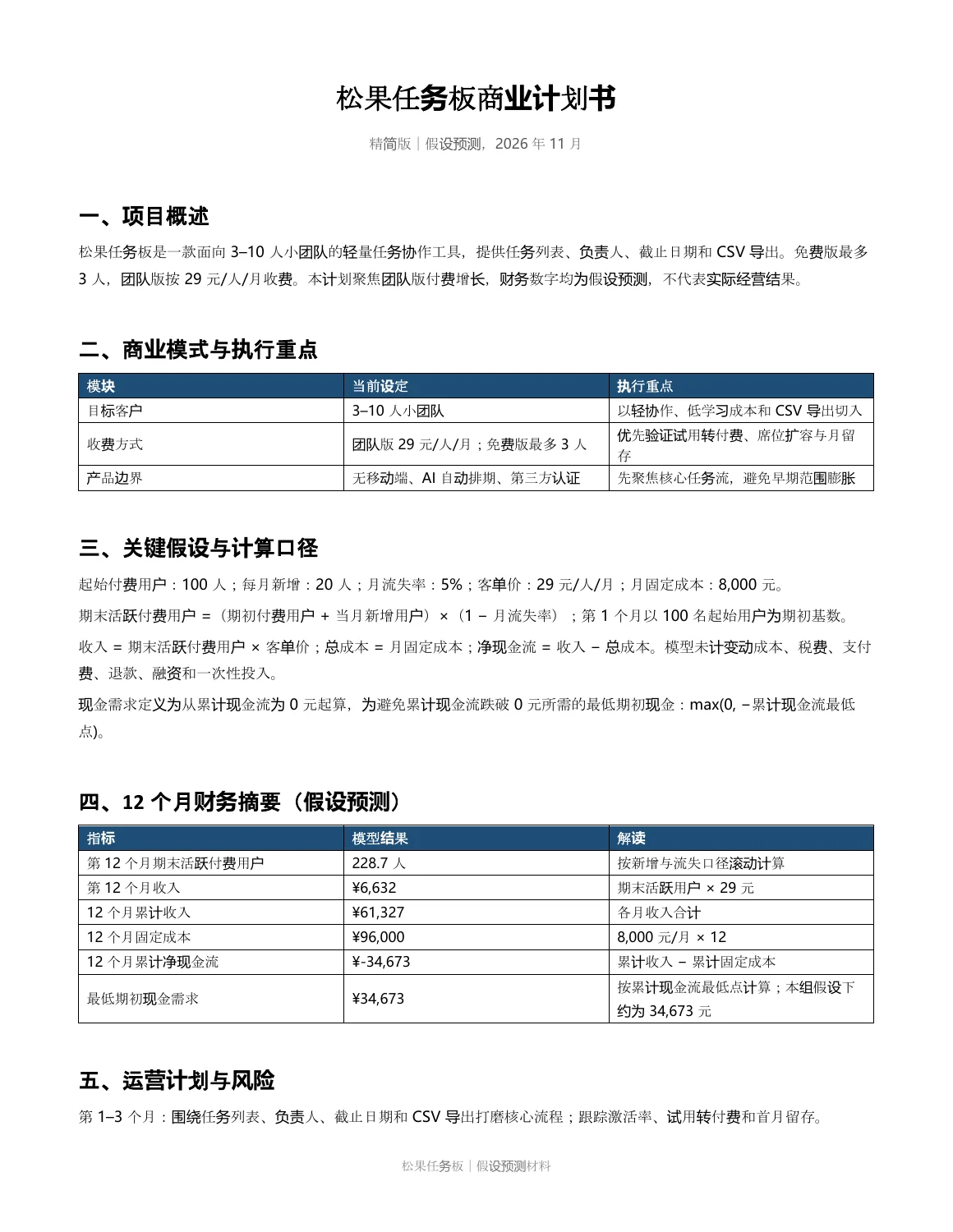
business-plan.docxwith the overview, business model, assumptions and calculation basis, 12-month financial summary, operating plan, and risks. Financial figures are explicitly labeled as assumption-based forecasts. - Wrote this bilingual reporting set from the actual generated results.
Actual Results
- Month 12 ending active paid users: approximately 228.7.
- Month 12 revenue: approximately 6,632 yuan.
- 12-month cumulative revenue: approximately 61,327 yuan.
- 12-month fixed cost: 96,000 yuan.
- 12-month cumulative net cash flow: approximately -34,673 yuan.
- Minimum opening cash required: approximately 34,673 yuan, based on the lowest cumulative cash flow.
- Revenue, cost, and cash need are separate model sections. All figures are assumption-based forecasts, not actual results or commitments.
Checks
- Reopened
forecast.xlsxwithopenpyxland counted cells by formula type: 132 formulas inB6:M20and 143 inB6:N20including the summary column. These counts are stored as static snapshots in Checks B5/B6 (recount after changing the model), rather than using COUNTIF on calculated values. Key formulas such asB11 = B9*B10andB18 = B11-B15remain in place. - Ran ZIP integrity validation and opened
business-plan.docxwithpython-docx; the Word main title occurs once inword/document.xml. - Checked the Excel column widths, header styling, frozen panes, and wrapping. The summary column distinguishes period totals from ending values; N6 now shows the initial 100 users, not a sum of monthly beginning balances. Revenue, cost, cash-flow, and ending-user calculations are unchanged.
- Attempted the skill-provided strict DOCX validator, but the environment lacks the
defusedxmldependency. This check was not completed and is not claimed as passed.
Limitations
- Excel formulas will recalculate when opened in Excel or a compatible spreadsheet application. LibreOffice/soffice was not available in this environment, so no external spreadsheet-engine recalculation or visual rendering was performed.
- The model excludes variable costs, customer acquisition cost, taxes, payment fees, refunds, financing, one-time investments, and collection timing; actual cash needs may be higher.
- Churn is modeled as 5% of beginning users plus current-month additions. User counts retain formula precision and are rounded only for display.
Download and inspect the outputs
The archive contains the files created during this run. Use these checks when adapting the example to your own data.
- Reconcile the reported results against the downloadable sample inputs.
- Open the generated files and check the contents relevant to your task.
- Review the limitations and any unverified steps in the report.