Bug Location & Fix: a Tokeny case study
Analyze error logs and stack traces to locate root causes and provide fix solutions. Follow the recorded task, execution screenshots, actual files and verification notes.
By the Tokeny team · Windows · Tokeny 1.7.8 · gpt-6-sol
Prepare the inputs
Create a separate workspace in Tokeny, download and unpack the sample inputs, then select a model that supports tools. The sample uses synthetic data or the public sources named in the article.
- billing.py
- error.txt
Send the task to Tokeny
The original task was executed in Chinese. Copying these instructions reproduces the same task; the results below include an English report.
复现账单函数在字符串金额上出错的问题,定位根因并修复,补充有效输入、空列表、非法金额的测试并真实运行。

交付文件:billing_fixed.py、test_billing.py、diagnosis.md。
验收要点:
- 字符串金额合计 20.00
- 用 Decimal 或整数分避免浮点误差
- 测试真实通过
这是使用合成演示输入或指定公开资料的真实操作案例。请先读取工作空间输入,再实际生成文件并自检。所有写入、脚本与临时服务限于当前工作空间;临时服务只监听 127.0.0.1,执行后关闭;不触达外部收件人、不发布、不付款、不更改系统设置,不调用子智能体。需要公开资料时可读取给定 URL。只启用完成任务必需的工具。另写 report.md(中文)和 report.en.md(英文),简洁、完整,包含输入、处理步骤、真实结果、检查方式和局限;失败或未验证部分如实记录,不能宣称成功。最终回复用中文列出产物、关键结果与待核实项。
The recorded run used an isolated demonstration workspace. Review the commands and file paths before approving operations in your own workspace.
What actually ran
The task was submitted through the Tokeny input box. An online model read the inputs and executed tools. This run covers the local sample task and its actual files. Results and checks are recorded below.
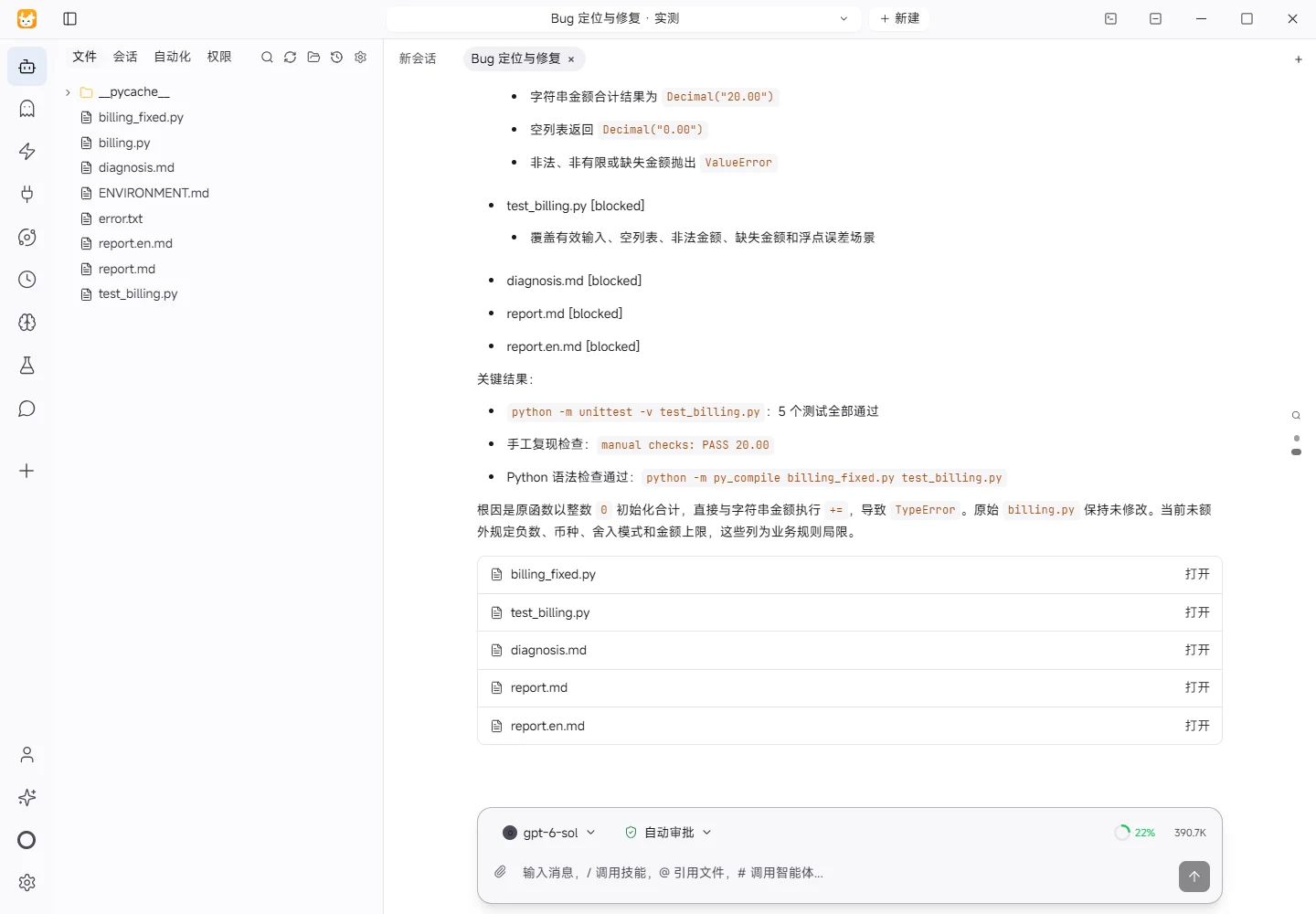
Results and verification
Input
I read billing.py, error.txt, and ENVIRONMENT.md from the workspace. The reproduction input was:
[{"amount":"12.30"},{"amount":"7.70"}]
The original function initialized the total as integer 0 and added string amounts, causing a TypeError.
Processing Steps
- Located the type mismatch at
total += row["amount"]inbilling.py. - Created
billing_fixed.pyusingDecimal(str(value))for parsing and accumulation. - Quantized the result to two decimal places; an empty list returns
Decimal("0.00"). - Raised
ValueErrorfor invalid, non-finite, or missing amounts. - Created
test_billing.pycovering valid input, empty lists, invalid amounts, missing amounts, and float-error prevention.
Actual Results
Ran python -m unittest -v test_billing.py: all 5 tests passed.
An additional manual command checked the reproduction input and printed:
manual checks: PASS 20.00
The string amounts therefore sum to Decimal("20.00").
Check Method
The tests were executed with Python's standard-library unittest. A separate command asserted the total and empty-list result.
Limitations
Negative values, currency codes, rounding policy, and maximum amount limits are not defined by the supplied requirements. The implementation currently treats amounts as values normalized to two decimal places. The original billing.py was left unchanged; the fixed implementation is in billing_fixed.py.
Download and inspect the outputs
The archive contains the files created during this run. Use these checks when adapting the example to your own data.
- Reconcile the reported results against the downloadable sample inputs.
- Open the generated files and check the contents relevant to your task.
- Review the limitations and any unverified steps in the report.